Two engines, one decision: how Lizard routes your model
-
Lizard ships two execution engines and picks between them for you. This is the part people ask about most, so here is the actual decision.
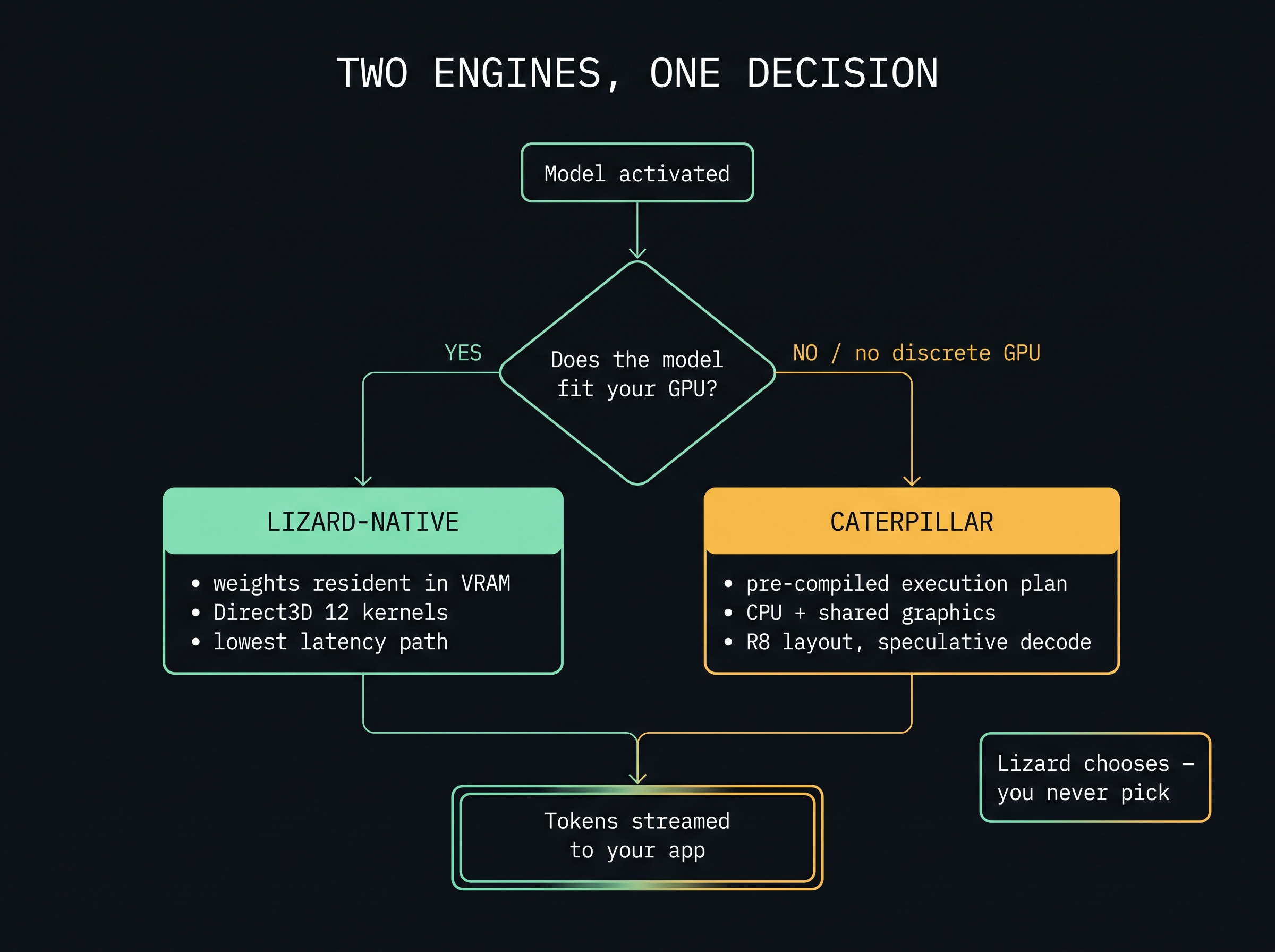
The question it asks is simple: does this model fit in your GPU's memory, alongside the KV cache and everything else already on the card?
If yes → lizard-native. Weights go resident in VRAM, work runs through Direct3D 12, and this is the fastest path available on your hardware.
If no, or there is no discrete GPU → caterpillar. This is the newer engine, built around a pre-compiled execution plan rather than interpreting a graph each token. It is designed for the case most benchmarks ignore: a normal laptop with integrated graphics.
A few things worth knowing about caterpillar specifically, because they are unusual:
- The weight layout is the optimisation. Decoding is memory-bound, so the win came from reading fewer bytes per token, not from doing arithmetic faster. Restructuring the four-bit weight layout into eight-row tiles cut bytes-read per token by about 13% and decode time by about 8% — with byte-identical output.
- Speculative decoding is lossless. On predictable text it drafts several tokens and verifies them in a single pass over the weights, then keeps only the ones the real model agrees with. Same output, fewer passes. On ordinary prose the acceptance rate drops, so it stops trying rather than making you pay for failed guesses.
- Physical cores beat logical threads. Because the limit is memory bandwidth, using every hyperthread adds contention without adding bandwidth. Four threads measured faster than eight on a 4-core laptop.
An honest note on where this sits. Measured against stock llama.cpp on the same machine, caterpillar's general-case decode is not yet ahead — llama.cpp runs at roughly 78% of that machine's memory-bandwidth ceiling and caterpillar around 49%. The speculative path beats it on draftable output. We publish both numbers rather than the flattering one, and the gap is a kernel-efficiency problem we are still working on.
If you want to see what your own machine does, the readiness check in setup gives you tokens per second for free — no credits, no benchmark suite needed.
Hello! It looks like you're interested in this conversation, but you don't have an account yet.
Getting fed up of having to scroll through the same posts each visit? When you register for an account, you'll always come back to exactly where you were before, and choose to be notified of new replies (either via email, or push notification). You'll also be able to save bookmarks and upvote posts to show your appreciation to other community members.
With your input, this post could be even better 💗
Register Login