Skip to content
  • Categories
  • Recent
  • Tags
  • Popular
  • World
  • Users
  • Groups
Skins
  • Light
  • Brite
  • Cerulean
  • Cosmo
  • Flatly
  • Journal
  • Litera
  • Lumen
  • Lux
  • Materia
  • Minty
  • Morph
  • Pulse
  • Sandstone
  • Simplex
  • Sketchy
  • Spacelab
  • United
  • Yeti
  • Zephyr
  • Dark
  • Cyborg
  • Darkly
  • Quartz
  • Slate
  • Solar
  • Superhero
  • Vapor

  • Default (No Skin)
  • No Skin
Collapse

Lizard-LLM Community

  1. Home

World

Topics from outside of this forum. Views and opinions represented here may not reflect those of this forum and its members.

Help
Load new posts
Log in to post

A world of content at your fingertips…

Think of this as your global discovery feed. It brings together interesting discussions from across the web and other communities, all in one place.

While you can browse what's trending now, the best way to use this feed is to make it your own. By creating an account, you can follow specific creators and topics to filter out the noise and see only what matters to you.

Ready to dive in? Create an account to start following others, get notified when people reply to you, and save your favorite finds.

Register Login
  • L
    L lizardadmin
    Benchmarks
    Why the same machine gives different numbers each run

    If you run the same benchmark twice and get different answers, nothing is broken.

    The usual causes, roughly in order:

    1. Heat. Laptops especially will slow themselves down after sustained load. A second run often lands lower than the first purely for this reason.
    2. Other software. A browser with many tabs, or anything using the GPU, competes for exactly the resource that limits generation speed.
    3. Cold vs warm model. The first run after loading includes work that later runs skip.

    This is why comparisons should be run alternating — A, B, A, B — rather than all of A then all of B. Otherwise you're partly measuring how warm the machine got.

    If your numbers swing by more than about 20% with nothing else running, that's worth posting about.


    0 0 0 Reply
  • L
    L lizardadmin
    Architecture
    lizard-native: the whole inference stack, running locally

    If Lizard is an inference provider, the fair question is which parts of the stack it actually owns. Here is the answer, top to bottom.
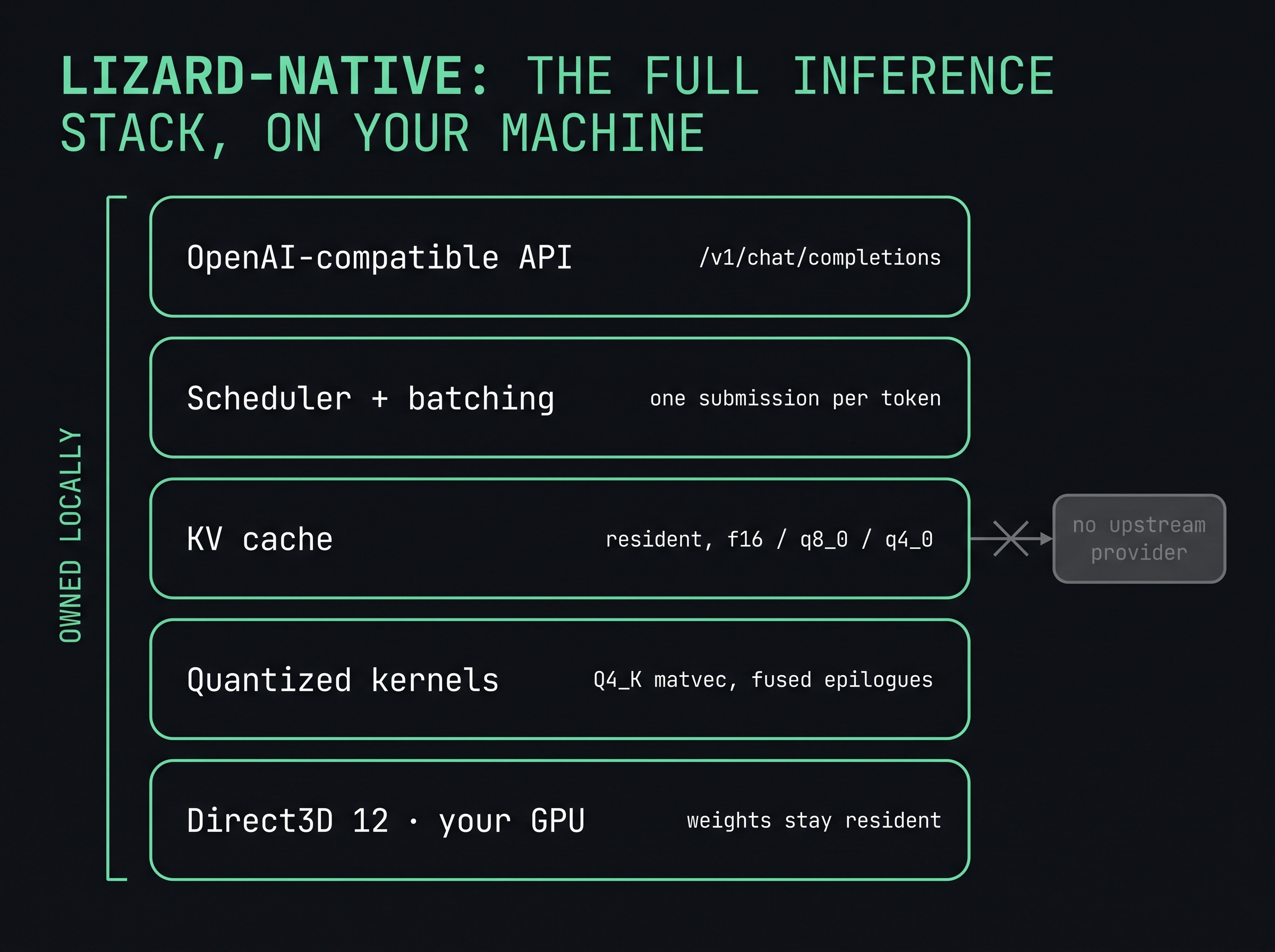
    lizard-native inference stack

    The API layer speaks the OpenAI Chat Completions format. This is deliberate: it means the client libraries you already use work by changing a base URL, and it means you are not locked in — anything you build against Lizard runs against a hosted provider too, and vice versa.

    Scheduling and batching is where a lot of local runtimes lose time. The naive approach submits work to the GPU many times per token, and each submission costs you. lizard-native compiles the decoder graph into coalesced spans ahead of time and gets that down to roughly one submission per generated token.

    The KV cache is resident and its precision is yours to pick — f16, q8_0, q4_0. This is the setting nobody exposes and everybody should: it is a direct trade between context length and memory. A hosted provider makes that choice for you and you never see it.

    The kernels are where the model's weights get multiplied. These are quantization-aware — Q4_K, Q5_K, Q6_K — with the elementwise work fused into the matrix multiply so a token costs fewer passes over memory.

    The device layer is Direct3D 12, and the important word is resident: the weights are uploaded once and stay in GPU memory. Loading is the expensive part; after the first time, the shaders are cached on disk too, so a load is seconds rather than a minute.

    Why this matters for a developer: every one of those layers is a decision that determines your tokens per second, and on a hosted API all of them are made somewhere you cannot see or change. Locally, they are yours — the KV cache precision and the quantization level are literally settings in the app.

    The practical ceiling is memory bandwidth, not arithmetic. Generating a token means reading the whole model out of memory, so on most machines the model's size divided by your memory bandwidth is the speed limit. That is also why a smaller quantization is often faster, not just smaller.

    0 0 0 Reply
  • L
    L lizardadmin
    Caterpillar
    How many CPU threads should Caterpillar use?

    Short answer: leave it alone — the default is now your physical core count, which measured fastest.

    Longer answer, because it surprises people: using every logical thread is usually slower, not faster. On a 4-core/8-thread laptop, 4 threads measured about 9% faster than 8, with steadier timings.

    The reason is that generating text is limited by how fast the machine can read the model from memory, not by how much arithmetic it can do. Extra threads add contention without adding memory bandwidth.

    If you want to experiment, CATERPILLAR_CPU_THREADS overrides it. If you try it, please post both numbers and your CPU — one result on its own is hard to learn from, since thermal state moves these numbers around a lot.


    0 0 0 Reply
  • L
    L lizardadmin
    What are you building?
    Offline and air-gapped setups

    One of the more interesting things about running locally: once a model is downloaded, the internet is optional.

    If you're using Lizard somewhere without a network — a plane, a locked-down site, a lab machine — a few notes worth sharing:

    • The model needs downloading once, on a connected machine or by copying the file across.
    • Generation, the chat app and the local API all work with no connection.
    • Update checks simply fail quietly. Nothing breaks.

    If you've set this up in an environment with real restrictions, how did you move the model files across, and did anything get in the way?


    0 0 0 Reply
  • L
    L lizardadmin
    Lizard Native
    Running a model that's bigger than your graphics card

    You don't need a card big enough to hold the whole model.

    When a model doesn't fit, Lizard has two honest options and it will tell you which one it took:

    1. Stream the weights through the GPU. The card still does the work, but it reads parts of the model as it goes. Slower than fully resident, but it's still a real GPU result.
    2. Hand it to Caterpillar, which is built for CPU and shared graphics.

    What it deliberately will not do is quietly pin an oversized model into shared memory and let it swap — that produces a machine that feels broken for no visible reason. If your model is too big for comfort, Lizard now says so and picks a supported path instead.

    Rule of thumb: a Q4 model needs roughly 60% of the download size in free graphics memory to stay fully resident.

    Anyone running a large model on a small card? What did you settle on?


    0 0 0 Reply
  • L
    L lizardadmin
    Architecture
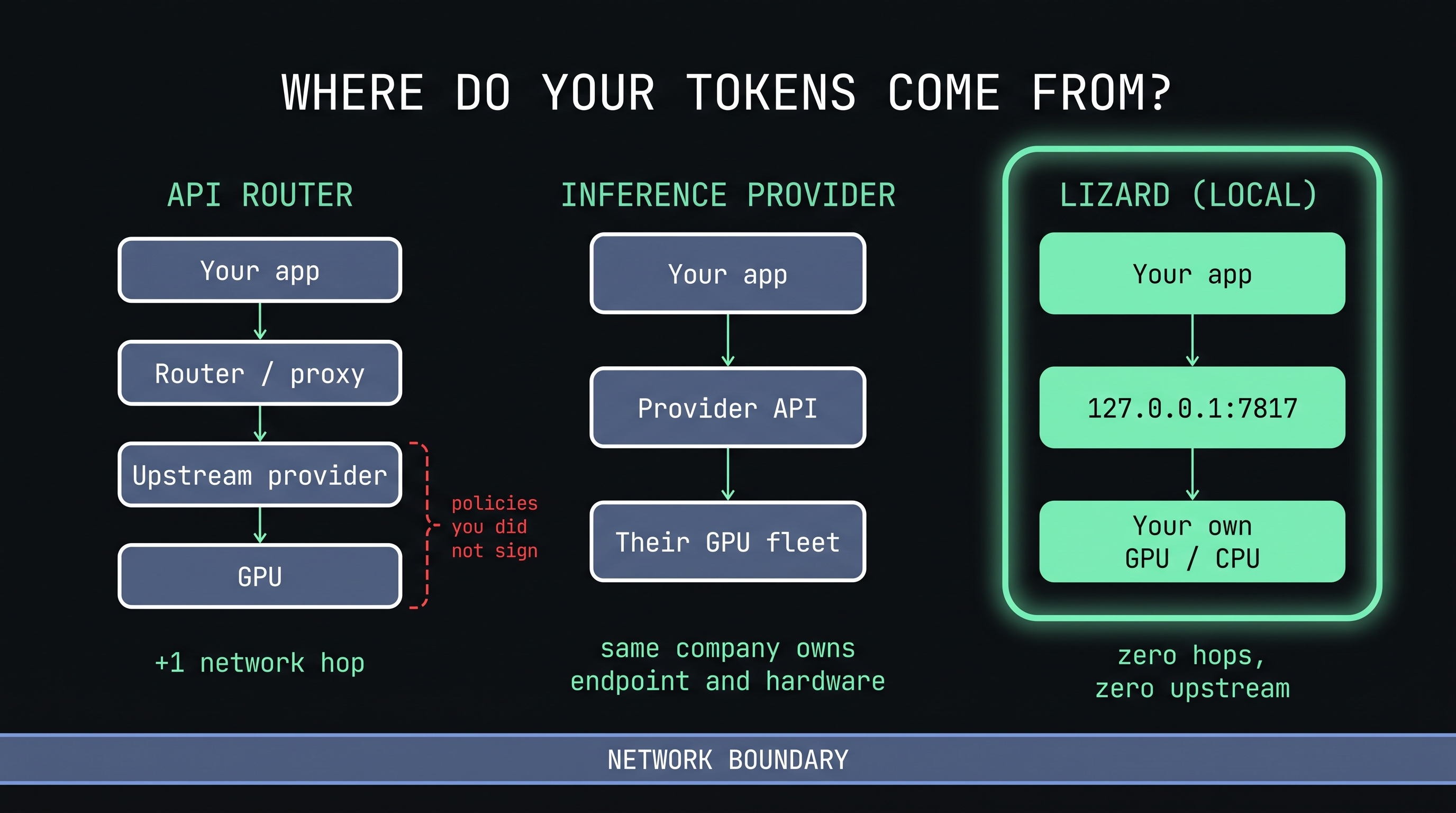
    Where do your tokens actually come from?

    When you call an LLM API, it is easy to assume the company you are calling is the one running the model. Often it isn't, and the difference matters more than it looks.

    Where do your tokens come from

    An API router is a proxy. It owns no compute. Your request arrives, gets forwarded to whichever upstream provider it has a deal with, and the response comes back through it. Useful — one key, many models, automatic failover when an endpoint degrades. But every request takes an extra network hop, so median time-to-first-token is always worse than calling that same provider directly. Routers improve tail latency by rerouting around bad endpoints; they cannot improve the median. Nothing they do touches the decisions that actually determine speed.

    An inference provider owns the hardware. The same company controls the endpoint and the GPUs your tokens are computed on. They choose the batching strategy, the KV cache layout, the kernels, the quantization. Those choices are what your latency and throughput actually come from.

    There is a second, quieter difference. A router can only bind itself. If you sign a zero-retention agreement with a router, your request still lands at an upstream provider whose policies you never reviewed. The agreement doesn't travel with your data.

    Lizard is an inference provider where the provider is your own machine. The endpoint is 127.0.0.1:7817, the GPU is the one in your computer, and there is no upstream at all — no hop to add latency, no third party to have a retention policy, no agreement chain to audit. When you turn off your Wi-Fi, it keeps working. That is the honest test of the claim, and you can run it yourself.

    The trade is real and worth stating: you get one machine's worth of compute, not a fleet. A hosted provider will out-run your laptop on a 70B model. What you get instead is that nothing leaves the building.

    How do you tell which kind you are using? Read the docs. "Our clusters", "our GPUs" means a provider. "Access 200+ models from leading providers" means a router. In a DPA, any mention of sub-processors or third-party infrastructure partners is a router tell — a direct provider has no such chain.


    0 0 0 Reply
  • L
    L lizardadmin
    Open Questions
    Which model should I pick?

    The honest answer: start with what setup recommends, then move up only if your machine looks bored.

    Rough guide by memory:

    RAM Sensible starting point
    8 GB 1–3B model, Q4
    16 GB 3–8B model, Q4
    32 GB+ 8B and above, Q4–Q6

    What the Q number means: compression. Q4 is roughly a quarter the size of the original with quality most people can't distinguish in normal use. Lower numbers are smaller and noticeably worse; higher are bigger and only marginally better. Q4 is the sweet spot and it's why it's the default.

    Bigger is not automatically better — a 3B model that fits comfortably will feel far better to use than an 8B one that makes your machine swap.

    What did setup suggest for you, and did you stick with it?


    0 0 0 Reply
  • L
    L lizardadmin
    Benchmarks
    Post your numbers — shared results thread

    A running thread for real results. Any hardware is interesting, especially modest machines — most published AI benchmarks assume an expensive GPU.

    Handy format:

    CPU:
    GPU (or none):
    RAM:
    Model + quant:
    Engine:           lizard-native / caterpillar
    Tokens/sec:
    Which check:      readiness / full benchmark
    

    Two things that make results comparable:

    • Note whether anything heavy was running (browser, game, video call) — it moves the numbers a lot.
    • If you ran it more than once, post the range rather than your best single figure. Machines heat up, and second runs often differ from first ones.

    0 0 0 Reply
  • L
    L lizardadmin
    Caterpillar
    Speculative decoding: why repetitive text suddenly runs faster

    You may notice Caterpillar getting noticeably quicker on some kinds of output — lists, structured text, anything repetitive — and behaving normally on ordinary prose. That's deliberate.

    The short version: generating a word normally means reading the whole model from memory once. If the next few words are predictable, Caterpillar drafts a guess and checks several words in a single pass instead of one pass each.

    Two things worth knowing:

    1. It is lossless. You get exactly the same words you would have got anyway — it's verified against the real model, not an approximation. If a guess is wrong it's thrown away.
    2. It steps aside when it isn't helping. On normal prose, guesses rarely land, so it stops trying rather than making you pay for failed guesses.

    So the honest summary is: sometimes much faster, never slower in a way you'd notice, never different output.

    Anyone seen a big speed-up on a particular kind of prompt?


    0 0 0 Reply
  • L
    L lizardadmin
    General Discussion
    Using Lizard from your own code (Python, Node, curl)

    Lizard serves the same API as OpenAI, on your machine. If you already have code written against a cloud AI service, you usually change one line.

    Start the server first:

    lizard-llm serve --model active
    

    Python

    from openai import OpenAI
    client = OpenAI(base_url="http://127.0.0.1:8013/v1", api_key="lizard-local")
    res = client.chat.completions.create(
        model="active",
        messages=[{"role": "user", "content": "Hello"}],
    )
    print(res.choices[0].message.content)
    

    Node.js

    import OpenAI from "openai";
    const client = new OpenAI({ baseURL: "http://127.0.0.1:8013/v1", apiKey: "lizard-local" });
    

    curl

    curl http://127.0.0.1:8013/v1/chat/completions \
      -H "Content-Type: application/json" \
      -d '{"model":"active","messages":[{"role":"user","content":"Hi"}]}'
    

    The key is ignored — nothing leaves your computer — but most clients insist on a value, so give it anything.

    Anything that reads OPENAI_BASE_URL (LangChain, LlamaIndex, lots of editor plugins) can point at Lizard the same way:

    OPENAI_BASE_URL=http://127.0.0.1:8013/v1
    OPENAI_API_KEY=lizard-local
    

    Full docs: https://lizard-llm.qendryx.com/docs.html

    What have you wired it into?


    0 0 0 Reply
  • L
    L lizardadmin
    Lizard Native
    Why the first load is slow and every one after is fast

    A question that comes up a lot: "the first time I load a model it takes a while, then it's instant. Why?"

    The engine compiles small GPU programs (shaders) for your specific hardware the first time it runs. That compile used to happen on every load, which meant waiting a minute or more each time.

    Those compiled shaders are now written to disk and reused. So:

    • First ever load on this machine: a few seconds of compiling.
    • Every load after: near-instant, including different models and after a reboot.

    If your first load is still slow every single time, that's worth reporting — it usually means the cache directory isn't writable.

    How long does a load take on your setup, cold vs. warm?


    0 0 0 Reply
  • L
    L lizardadmin
    What are you building?
    Show us what you've made

    A place for what you're actually doing with a local model — working, half-finished or abandoned, all interesting.

    Some things people use this kind of setup for:

    • Drafting and rewriting without documents leaving the building
    • Summarising long files that shouldn't go to a cloud service
    • Coding help on a locked-down or offline network
    • Something running on a schedule, where per-call pricing would be awkward

    If you've wired Lizard into an editor, a script or a larger tool, the setup details are the useful part — that's what others can copy.


    0 0 0 Reply
  • L
    L lizardadmin
    Caterpillar
    What Caterpillar is, and why there are two engines

    Caterpillar is the newer of Lizard's two engines. It exists because a gaming PC and a work laptop need genuinely different approaches to run the same model well.

    Where lizard-native leans on your graphics card, Caterpillar is built to get the most out of:

    • your processor, when there's no dedicated card, and
    • shared/built-in graphics, where memory is tight.

    Lizard picks it automatically — you never choose. It takes over when there's no discrete GPU, or when the model is too large to sit on the one you have.

    It's also where most active development happens right now. Recent work made CPU decoding meaningfully faster and cut how much memory it reads for each word it generates.

    More detail: https://lizard-llm.qendryx.com/product.html

    If you're on a laptop with no dedicated card, this is the engine you're using — how does it feel?


    0 0 0 Reply
  • L
    L lizardadmin
    Open Questions
    Ask anything — no question too basic

    This section is for questions, including the ones that feel too simple to ask. "What does quantization mean?" is a perfectly good question and plenty of people want the answer.

    To get a useful reply quickly, it helps to include:

    • What you're trying to do
    • Your machine (CPU, GPU if any, RAM)
    • The model you picked
    • What actually happened, including the exact message if there was one

    If something failed, the message text matters more than a description of it — the wording usually points straight at the cause.


    0 0 0 Reply
  • L
    L lizardadmin
    Lizard Native
    What lizard-native is, and when Lizard picks it

    lizard-native is the engine that runs your model on your graphics card.

    It loads the model's weights into GPU memory once and keeps them there. That's the whole trick: the model stays resident, so after the first load, answers start almost immediately instead of re-reading gigabytes from disk every time.

    Lizard chooses it automatically when:

    • you have a DirectX 12 graphics card (including built-in Intel Iris Xe), and
    • the model actually fits in that card's memory alongside everything else running.

    What you'll notice:

    • First load takes a few seconds while shaders compile. That result is cached on disk, so every load after is near-instant — even for a different model, or after restarting.
    • Memory use is lower than you'd expect for the file size, because of how the weights are packed.

    If it isn't being used, it's usually one of two things: no DirectX 12 adapter, or the model is bigger than the card. Lizard then hands the work to Caterpillar instead — that's by design, not a failure.

    More detail: https://lizard-llm.qendryx.com/product.html

    What card are you running, and what does your first-load time look like?


    0 0 0 Reply
  • L
    L lizardadmin
    General Discussion
    Start here — what Lizard is and how to get going

    Welcome. Short version of what this is:

    Lizard runs a real AI model on your own computer. No cloud account, no usage limits, and what you type never leaves your machine. It checks what your hardware can handle, suggests a model that fits, and gets you chatting in a few minutes.

    Getting started:

    1. Install and open it — everything's in the one installer, no Python or Docker needed first.
    2. Let it scan your machine. It only suggests models that will actually run well.
    3. Pick one, let it download, activate it.
    4. Talk to it — either the quick test chat in setup, or the full chat app from the tray icon.

    Two ways to chat:

    • Quick chat in setup — a fast check that a model answers sensibly.
    • Chat app (tray icon → Open chat app) — the full window, keeps your conversation, warms the model and lets you unload it when you're done.

    Docs: https://lizard-llm.qendryx.com/docs.html · FAQ: https://lizard-llm.qendryx.com/faq.html

    Introduce yourself and say what you're running it on — the hardware range here is genuinely wide.


    0 0 0 Reply
  • L
    L lizardadmin
    Benchmarks
    Read this first: what the benchmark actually measures

    The benchmark runs your model on your hardware and reports what happened. A few principles it sticks to:

    • Measured means measured. Every number is labelled — Measured, Estimated, Mixed, Partial. If a run didn't finish, you get Incomplete, not a filled-in guess.
    • Nothing is invented. There are no synthetic values anywhere. A missing number shows as —.
    • Derived numbers inherit the weakest input. Measured speed divided by an estimated memory figure is labelled Mixed, never Measured.

    Free readiness check vs. full benchmark: the readiness check in setup is free and always available — it tells you tokens/sec for your model on this machine. The full suite (Lizard vs Ollama vs llama.cpp across Q1–Q9) is the credit-based one.

    Full explanation: https://lizard-llm.qendryx.com/benchmarks.html

    When posting results, your CPU/GPU and model + quantization make them useful to everyone else.


    0 0 0 Reply
  • Login

  • Don't have an account? Register

  • Login or register to search.
Powered by NodeBB Contributors
  • First post
    Last post
0
  • Categories
  • Recent
  • Tags
  • Popular
  • World
  • Users
  • Groups