Skip to content
  • Categories
  • Recent
  • Tags
  • Popular
  • World
  • Users
  • Groups
Skins
  • Light
  • Brite
  • Cerulean
  • Cosmo
  • Flatly
  • Journal
  • Litera
  • Lumen
  • Lux
  • Materia
  • Minty
  • Morph
  • Pulse
  • Sandstone
  • Simplex
  • Sketchy
  • Spacelab
  • United
  • Yeti
  • Zephyr
  • Dark
  • Cyborg
  • Darkly
  • Quartz
  • Slate
  • Solar
  • Superhero
  • Vapor

  • Default (No Skin)
  • No Skin
Collapse

Lizard-LLM Community

  1. Home

World

Topics from outside of this forum. Views and opinions represented here may not reflect those of this forum and its members.

Help
Load new posts
Log in to post

A world of content at your fingertips…

Think of this as your global discovery feed. It brings together interesting discussions from across the web and other communities, all in one place.

While you can browse what's trending now, the best way to use this feed is to make it your own. By creating an account, you can follow specific creators and topics to filter out the noise and see only what matters to you.

Ready to dive in? Create an account to start following others, get notified when people reply to you, and save your favorite finds.

Register Login
  • L
    L lizardadmin
    Lizard Native
    Lizard inference engineering: Budget against free VRAM, not the sticker

    Inference Engineering · Day 2 · Morning

    The number on the GPU box is not your inference budget.

    Windows, the display pipeline, browsers and other applications already occupy graphics memory. Planning against total VRAM can turn a model that looks safe into a load failure or an eviction loop.

    Lizard asks the driver what is available now, then budgets model weights and runtime needs against that live figure. If the fit is unsafe, it chooses a supported path and reports why.

    Capacity planning should begin with free memory, not advertised memory.

    Engineering fact: Lizard checks the graphics driver's currently available memory rather than assuming the GPU's advertised total is free.

    Read the relevant Lizard page

    #VRAM #GPUEngineering #LocalAI #LizardLLM #InferenceEngineering

    <!-- lizard-marketing-slot:day-02-am -->


    0 0 0 Reply
  • L
    L lizardadmin
    Benchmarks
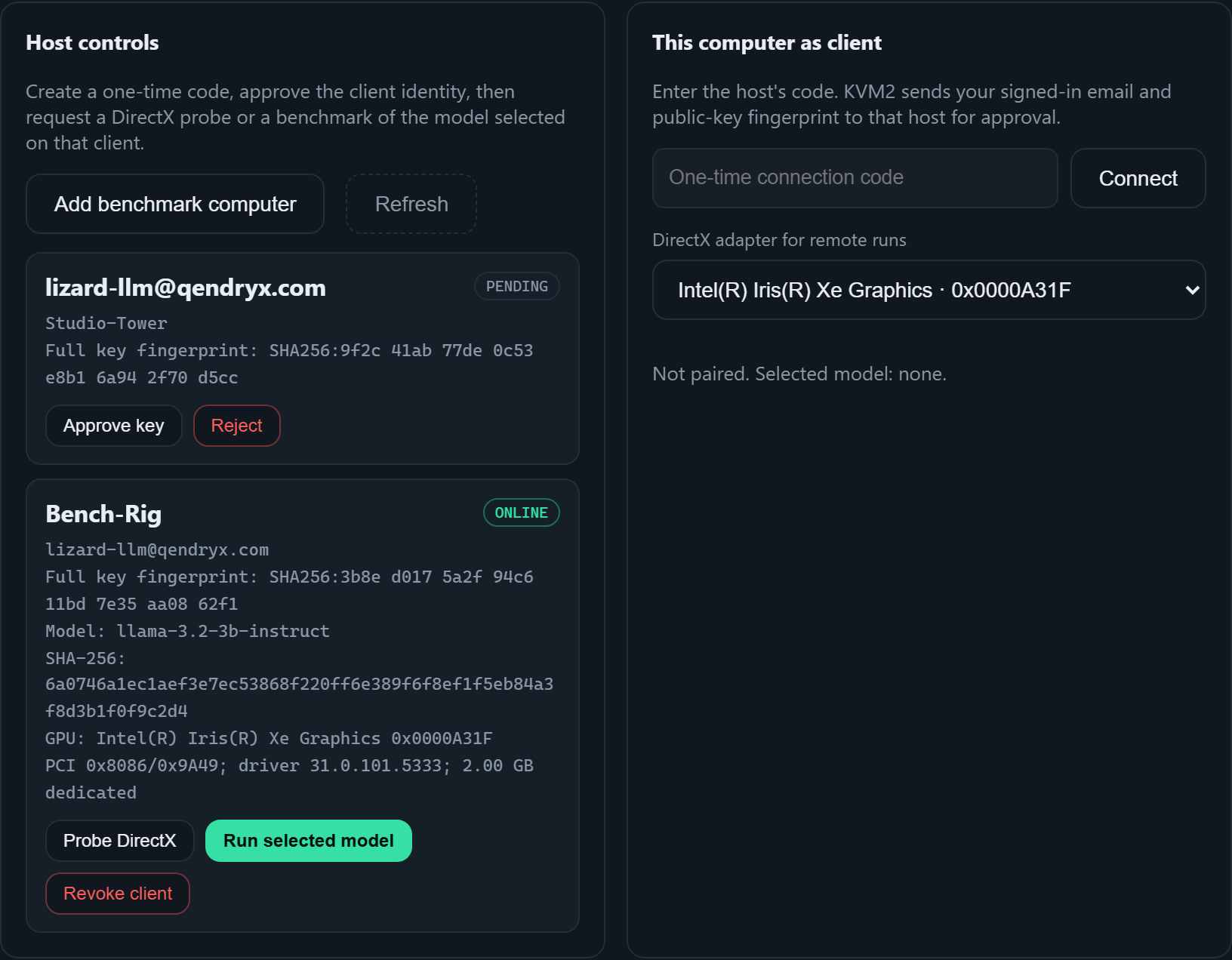
    Remote benchmarking: measure the PC in the other room, without opening a port

    If the machine with the interesting GPU is not the one you sit at, you can now benchmark it from the one you are at.

    Lizard remote pairing: the host approves a client key fingerprint while the client joins with a one-time code

    No inbound port

    Both computers open an outbound HTTPS/WSS connection to the relay. Neither machine accepts an inbound connection, so there is nothing to forward on your router and no inbound firewall rule to add. The relay queues messages between the two and never holds a model.

    Pairing

    1. On the computer doing the asking, press Add benchmark computer for a one-time code.
    2. Enter that code on the other PC. It sends its signed-in account email and public-key fingerprint through the relay.
    3. The host sees the email and the full key fingerprint, and approves or rejects it. A machine you have not approved cannot be asked to do anything.
    4. Request a DirectX probe, or a benchmark of the model selected on that client. The client confirms before anything runs.
    5. Read the result.

    What comes back is evidence, not a headline

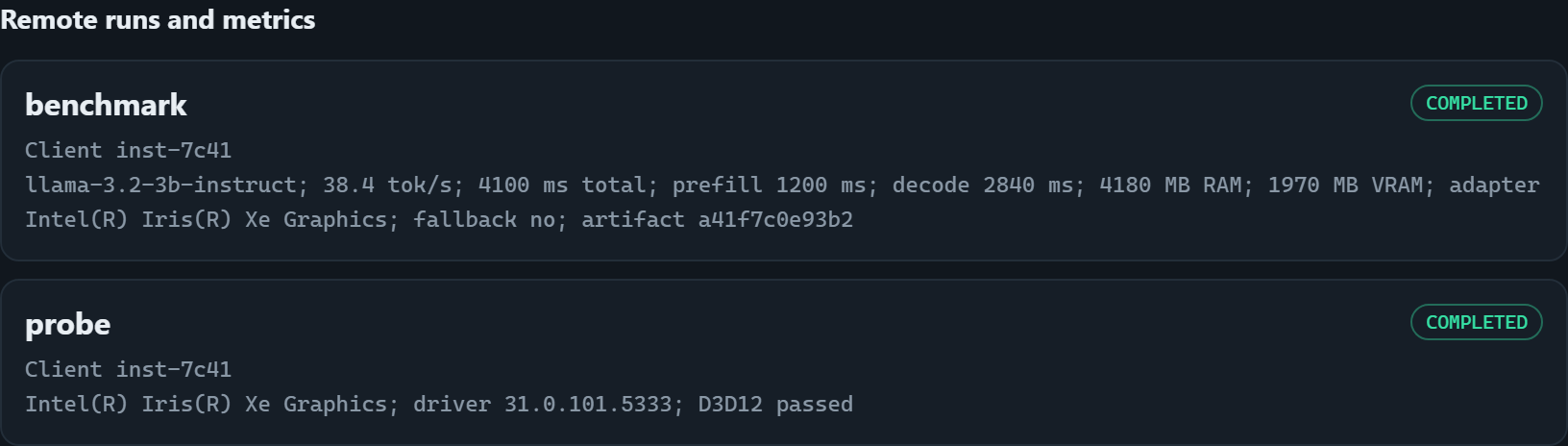
    Two completed remote runs showing tokens per second, prefill and decode split, memory peaks, adapter and fallback state

    Each completed run returns: model id and SHA-256, tokens per second and total ms, the prefill/decode split, peak RAM and VRAM, GPU adapter and driver version, and whether a fallback path was used.

    That last field is the one that matters. If the GPU path was not actually used, the run says so instead of quietly reporting a CPU number as a GPU result.

    What never crosses the network

    Model weights stay on the machine that runs them — never uploaded, never relayed. Prompts and answers stay local too; a remote run measures speed, not text.

    Availability

    Remote benchmarking is part of Pro. The five-day trial covers local benchmarks, the dashboard and both native engines; buying credits once adds remote runs and keeps them.

    Full details: https://lizard-llm.qendryx.com/remote.html

    Question: which two machines are you comparing, and how far apart did they land?


    0 0 0 Reply
  • L
    L lizardadmin
    General Discussion
    Lizard Chat: ask for a chart and the answer arrives with it

    Lizard Chat is the chat workspace built into the app, running on whatever model you activated. Since 1.2.52 it draws charts — and there is no chart button, no menu and no special syntax to learn.
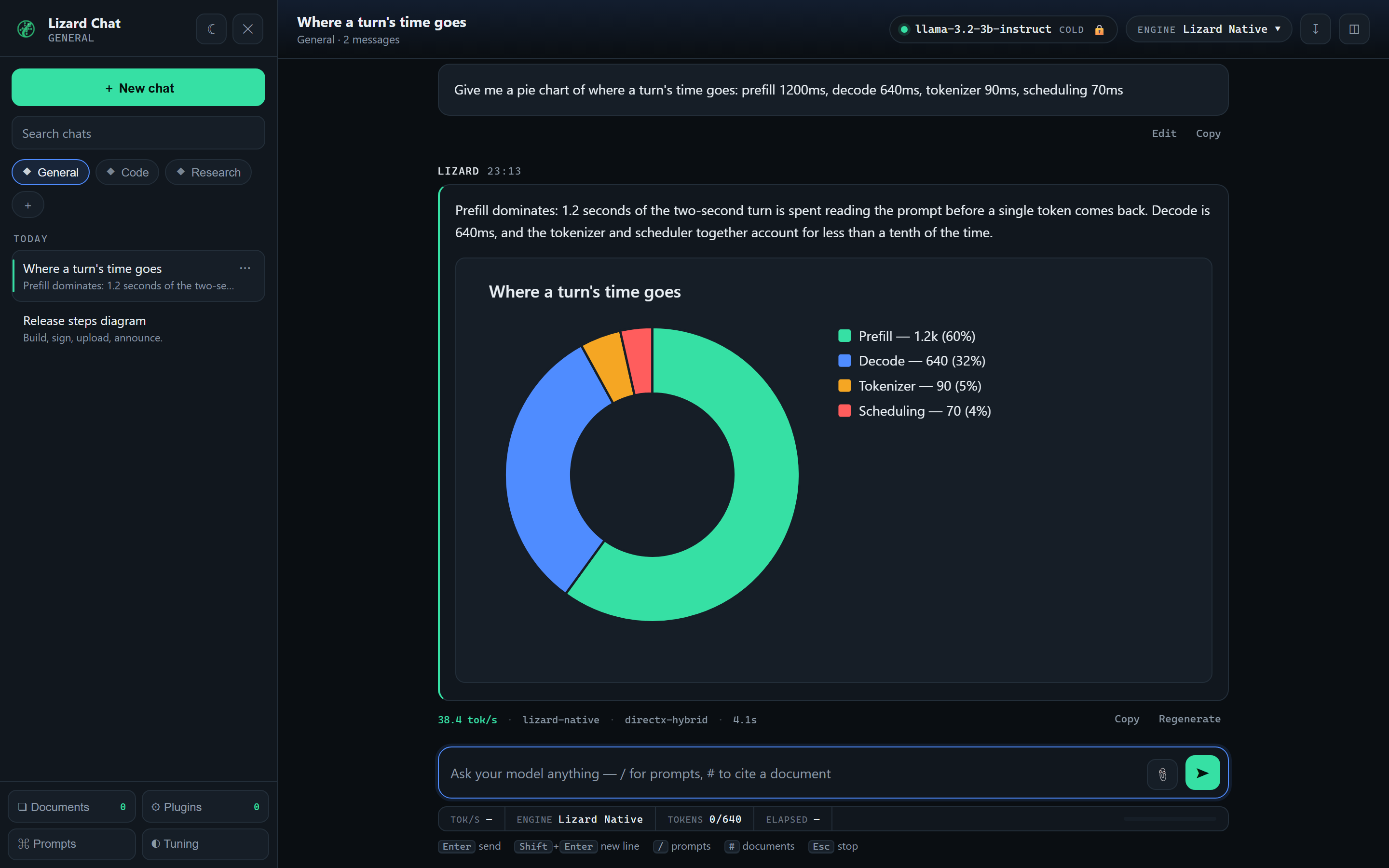
    Lizard Chat answering with a donut chart of where a turn's time goes

    How it decides

    Ask a question that wants a picture and you get one:

    • Show me a bar chart of my disk use in GB: models 22.2, benchmark history 0.17, logs 0.4
    • Plot the price over the last four months: 3.10, 3.40, 3.25, 3.90
    • Draw a diagram of how a release happens: build, sign, upload, announce
    • Give me a pie chart of my week: coding 30 hours, meetings 8, reading 4

    The wording only decides which example the model is shown. The model emits the chart type itself and can overrule that suggestion. Asked to "make a diagram of revenue by quarter", llama-3.2-3B returned a line chart — four quarters of revenue are a trend, not a flowchart.

    It can also decide a chart would not help and just answer.

    Six shapes

    bar · line · area · pie · scatter · flow (boxes and arrows, for processes and architectures)

    What it will not do

    It will not draw something misleading. A single data point, a value it cannot read, a diagram with nothing connected — you get the written answer and no chart, rather than a picture implying data that was never there.

    Where it runs

    Everything: your message, your documents, the answer, the chart. The charting library ships inside the installer, so charts render with the network switched off. Nothing in the chat crosses the network.

    The rest of the workspace

    Saved and searchable conversations grouped by day, pin/rename/export as Markdown. Questions about your own text, Markdown, CSV, log and source files, with citations. Separate workspaces (General, Code, Research) each with their own instructions and documents. MCP plugins for folders, web pages, SQLite files and Git history.

    Full details: https://lizard-llm.qendryx.com/chat.html

    Question for the room: what did you ask it to chart, and did it pick the shape you expected?

    0 0 0 Reply
  • L
    L lizardadmin
    Lizard Native
    Lizard inference engineering: Keep model weights resident

    Inference Engineering · Day 1 · Evening

    Move tokens—not the model.

    A common local-inference cost is repeated setup and data movement. lizard-native takes a resident-weight approach: load the GGUF weights onto the Direct3D 12 device once, keep them there across calls, and reuse the warmed execution path.

    That does not make memory limits disappear. It makes residency an explicit planning decision instead of an accidental runtime surprise.

    The useful question becomes: does the model, cache and current workload fit safely on this device?

    Engineering fact: lizard-native uploads model weights once and keeps them resident on a Direct3D 12 GPU across calls.

    Read the relevant Lizard page

    #LizardNative #D3D12 #GPUInference #LocalAI #LizardLLM

    <!-- lizard-marketing-slot:day-01-pm -->


    0 0 0 Reply
  • L
    L lizardadmin
    Architecture
    Lizard inference engineering: An inference provider owns the stack

    Inference Engineering · Day 1 · Morning

    An API endpoint is not an inference engine.

    The engineering decisions that determine latency happen below the route: batching, KV-cache precision, quantized kernels, memory residency and device submission.

    Lizard treats the local machine as the inference provider. lizard-native owns the Direct3D 12 path; Caterpillar owns its compiled execution plan. The OpenAI-compatible endpoint is only the top layer.

    Which layer of your current inference stack can you actually inspect and change?

    Engineering fact: Lizard owns the local endpoint, scheduler, cache layout, kernels, quantization choices, and device execution path.

    Read the relevant Lizard page

    #InferenceEngineering #LocalAI #OnDeviceAI #LizardLLM #LLMEngineering

    <!-- lizard-marketing-slot:day-01-am -->


    0 0 0 Reply
  • L
    L lizardadmin
    Architecture
    Technical overview: Lizard Native and Caterpillar vs llama.cpp and Ollama

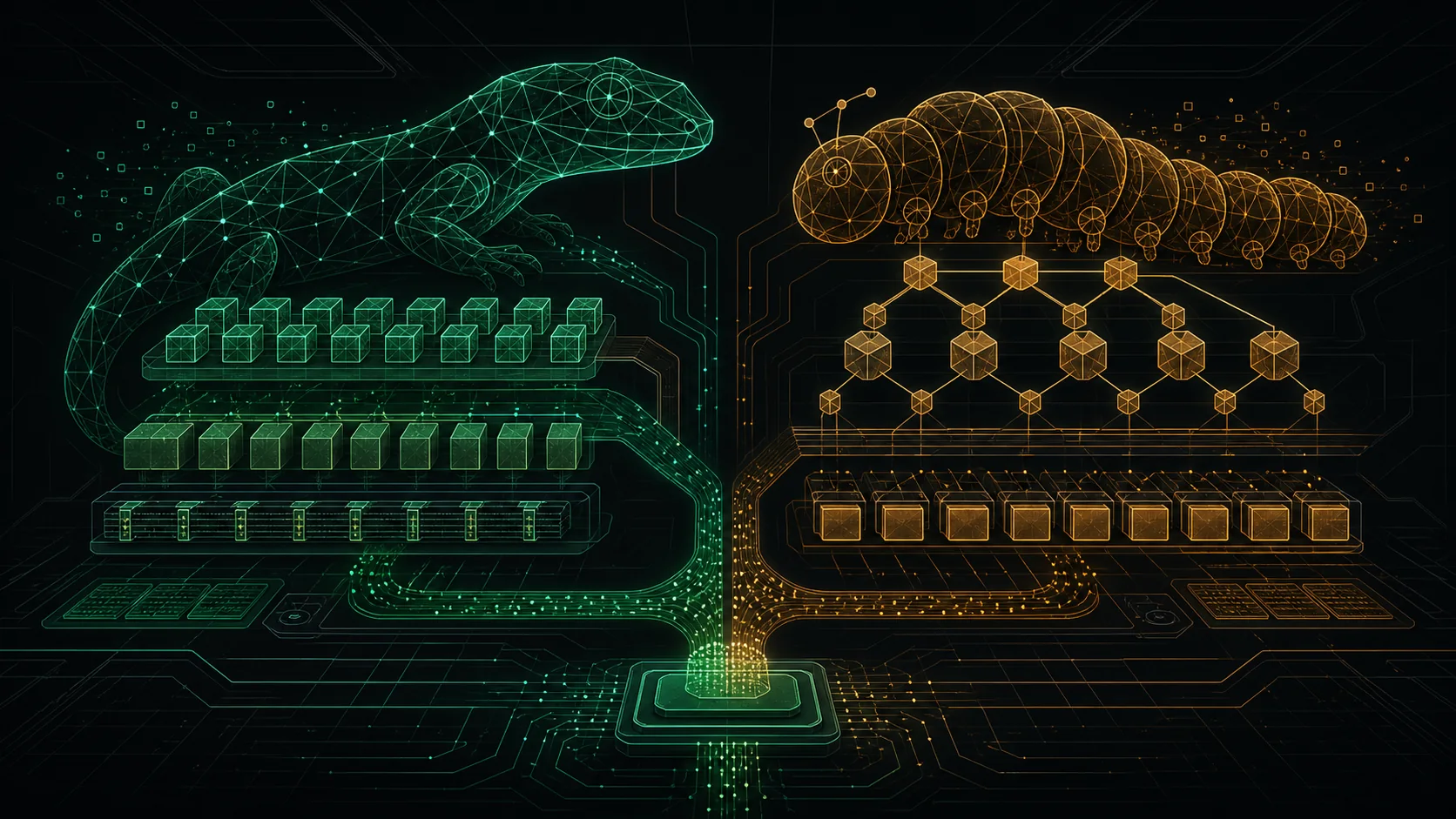
    The new architecture overview explains why these four names are not interchangeable categories.

    Lizard Native and Caterpillar converging on one local inference layer

    What each layer is for

    • Lizard Native — a specialized Windows-first resident-GPU provider using Direct3D 12 for its supported native subset.
    • Caterpillar — a standalone clean-room provider built around a typed DAG, reused activation arena, and compiled execution plan.
    • llama.cpp — a broad cross-platform inference toolkit and server with many CPU and GPU backends, wide model coverage, continuous batching, embeddings, reranking, and multimodal features.
    • Ollama — model packaging, acquisition, lifecycle, scheduling, and local APIs, including configurable model keep-alive and OpenAI-compatible endpoints.

    Lizard's extra control-plane work is the hardware scan, exact GGUF fit decision, native-provider routing, and provider-separated evidence. llama.cpp and Ollama remain useful stock baselines and compatibility fallbacks. No provider wins every model, metric, or machine.

    Primary baseline documentation:

    • llama.cpp project
    • llama-server
    • Ollama runtime FAQ
    • Ollama OpenAI compatibility

    Read the complete comparison table: https://lizard-llm.qendryx.com/technical-overview.html

    Question: Which comparison dimension matters most to you: platform coverage, model lifecycle, memory fit, or provider-level benchmark evidence?


    0 0 0 Reply
  • L
    L lizardadmin
    Caterpillar
    Technical overview: Caterpillar's clean-room graph-plan execution

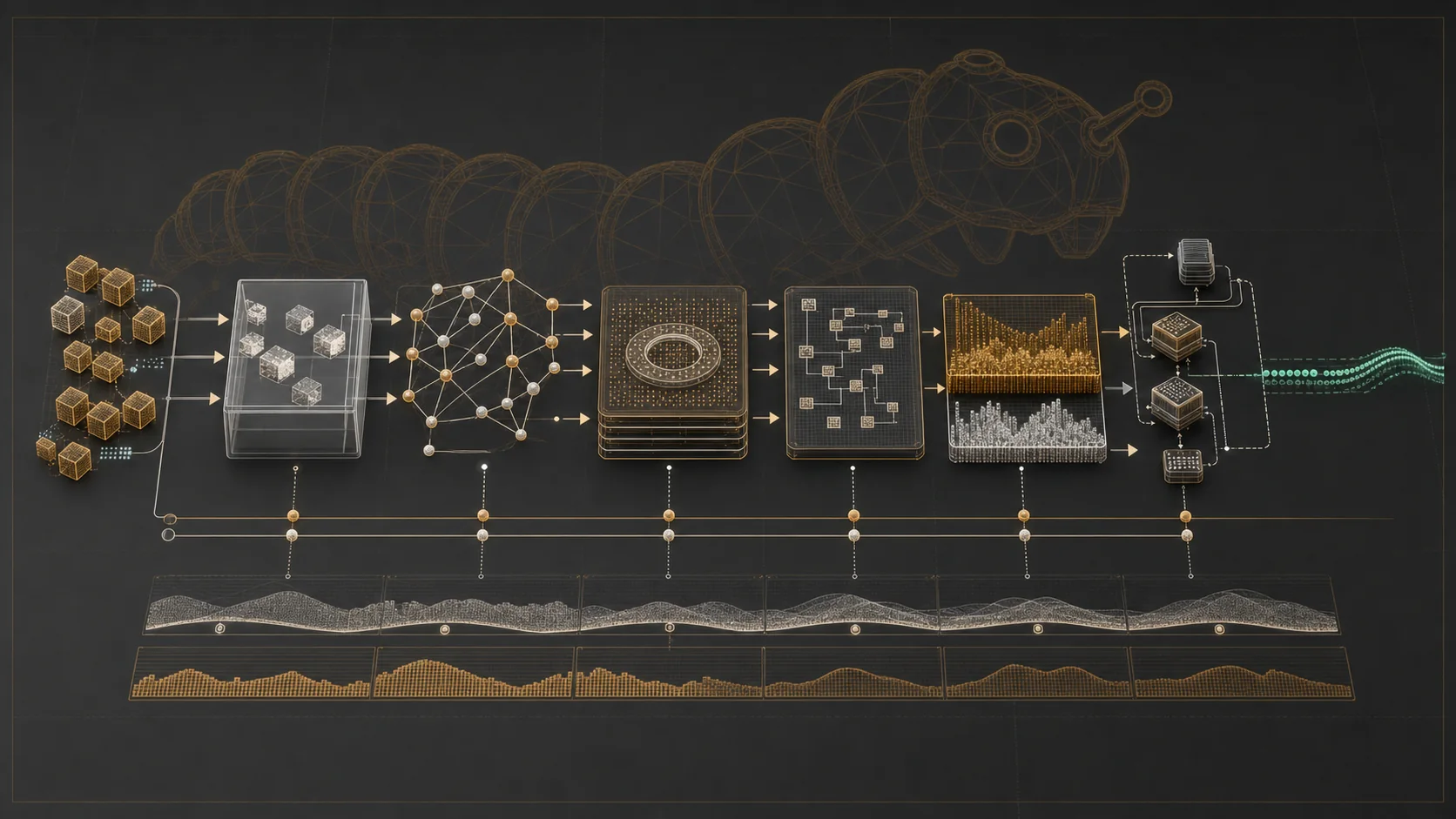
    Caterpillar is a separate clean-room inference provider. Its design makes graph validation, temporary-memory reuse, and execution planning explicit before token-by-token replay.

    Wireframe Caterpillar typed graph and compiled execution plan

    From GGUF to token stream

    1. Own GGUF reader — metadata and tensors are read by Caterpillar's standalone loader.
    2. Typed DAG validation — shapes and dependencies are checked before execution.
    3. Lifetime-reused activation arena — temporary storage can be reused when tensor lifetimes do not overlap.
    4. Precompiled graph plan — repeatable work is represented as a plan instead of rediscovered blindly for every decoded token.
    5. Coalesced CPU spans — compatible CPU operations can replay in grouped spans; supported paths can add speculative draft and verification.

    Caterpillar does not include llama.cpp, ggml, ik_llama, or Lizard Native source units. The providers can be measured beside each other, but they are not the same implementation.

    The engine is actively evolving, so supported native combinations are narrower than the compatibility paths. The landing page names that boundary instead of turning planned coverage into a present-tense claim.

    Read the complete layer map and comparison: https://lizard-llm.qendryx.com/technical-overview.html

    Question: Which part should we publish next in more depth: graph validation, activation lifetimes, compiled spans, or speculative verification?


    0 0 0 Reply
  • L
    L lizardadmin
    Lizard Native
    Technical overview: how Lizard Native keeps Direct3D 12 inference resident

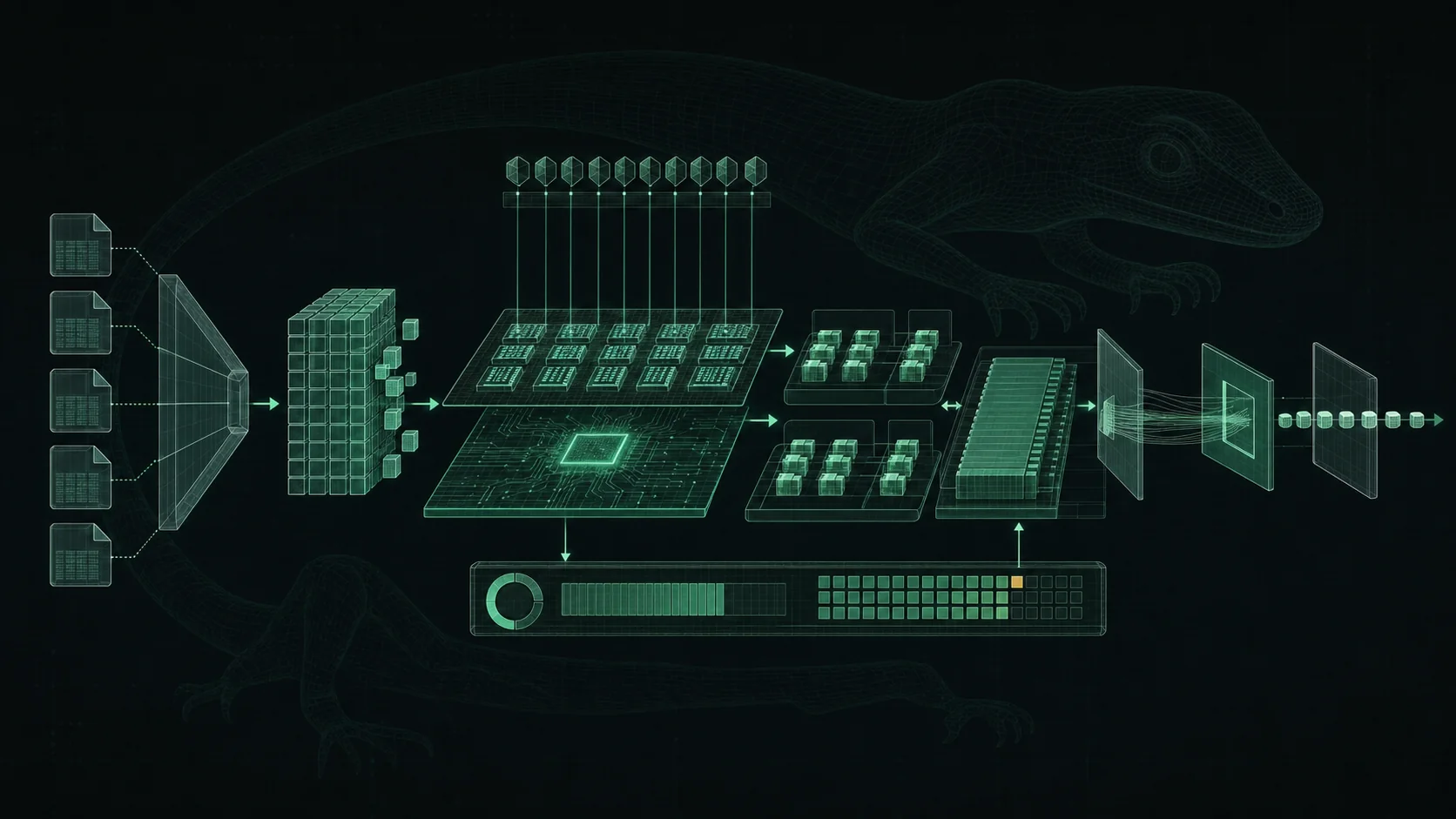
    Lizard Native is Lizard's stable, Windows-first native provider. For a supported model, it uploads quantized tensors to GPU-resident buffers and executes decode through Direct3D 12 compute shaders. The model-fit decision happens before execution and uses the exact GGUF identity plus the machine's available memory.

    Wireframe Lizard Native resident-weight architecture

    The layers

    1. Hardware and model-fit planning — CPU, memory, Direct3D 12 capabilities, model family, quantization, and live budget are evaluated before a native lane is selected.
    2. Resident model tensors — supported quantized weights stay in device buffers while the model is active instead of being reloaded for every request.
    3. Compute shaders — quantized operations run through Direct3D 12 compute; compiled shader artifacts are cached on disk.
    4. Memory discipline — residency is budgeted, and compatible UMA hardware can use a shared-memory path.
    5. Provider identity — a native row stays labeled Lizard Native. A llama.cpp or Ollama fallback is not reported as native.

    The boundary matters

    Lizard Native implements a tested native subset; it does not claim that every GGUF architecture and quantization runs on this provider. Unsupported combinations stay eligible for an explicit bundled llama.cpp or optional Ollama fallback.

    Read the complete layer map and comparison: https://lizard-llm.qendryx.com/technical-overview.html

    Question: On your Windows hardware, is the limiting factor available memory, shader execution, model coverage, or per-token scheduling?


    0 0 0 Reply
  • L
    L lizardadmin
    Benchmarks
    What the latest Native and Caterpillar results actually show

    These analyzed captures put Lizard Native and Caterpillar in the foreground beside stock llama.cpp and optional Ollama. They also show the honest result: no provider wins every metric, and Caterpillar trails the other two lanes in these selected general-case runs.

    Interactive gallery: https://lizard-llm.qendryx.com/benchmarks.html

    Wall time, throughput and decode are different metrics

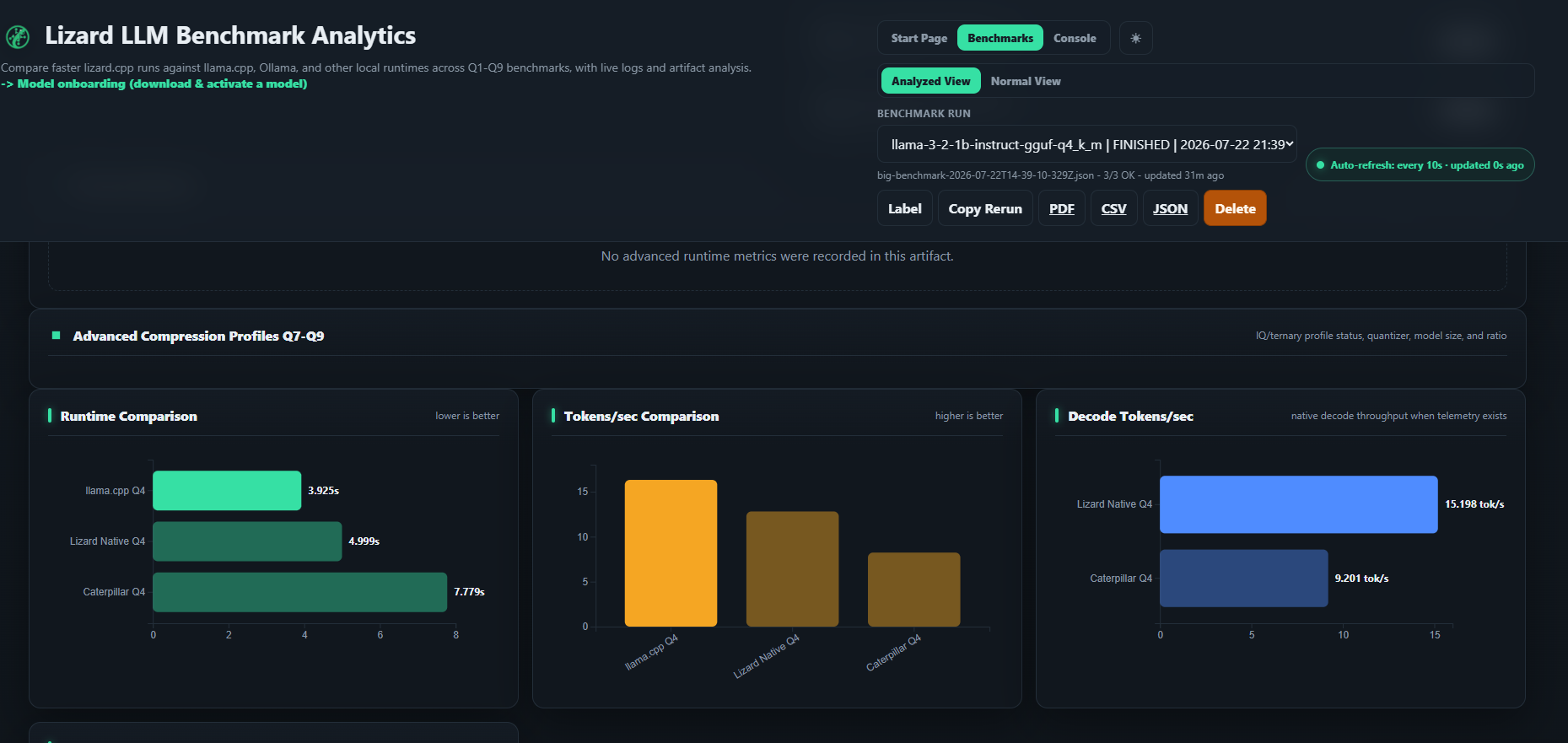
    Runtime throughput and decode charts

    llama.cpp wins this run's wall time and end-to-end throughput. Lizard Native leads native decode at 15.198 tok/s versus Caterpillar's 9.201. The dashboard does not blend those numbers.

    No provider wins every dimension

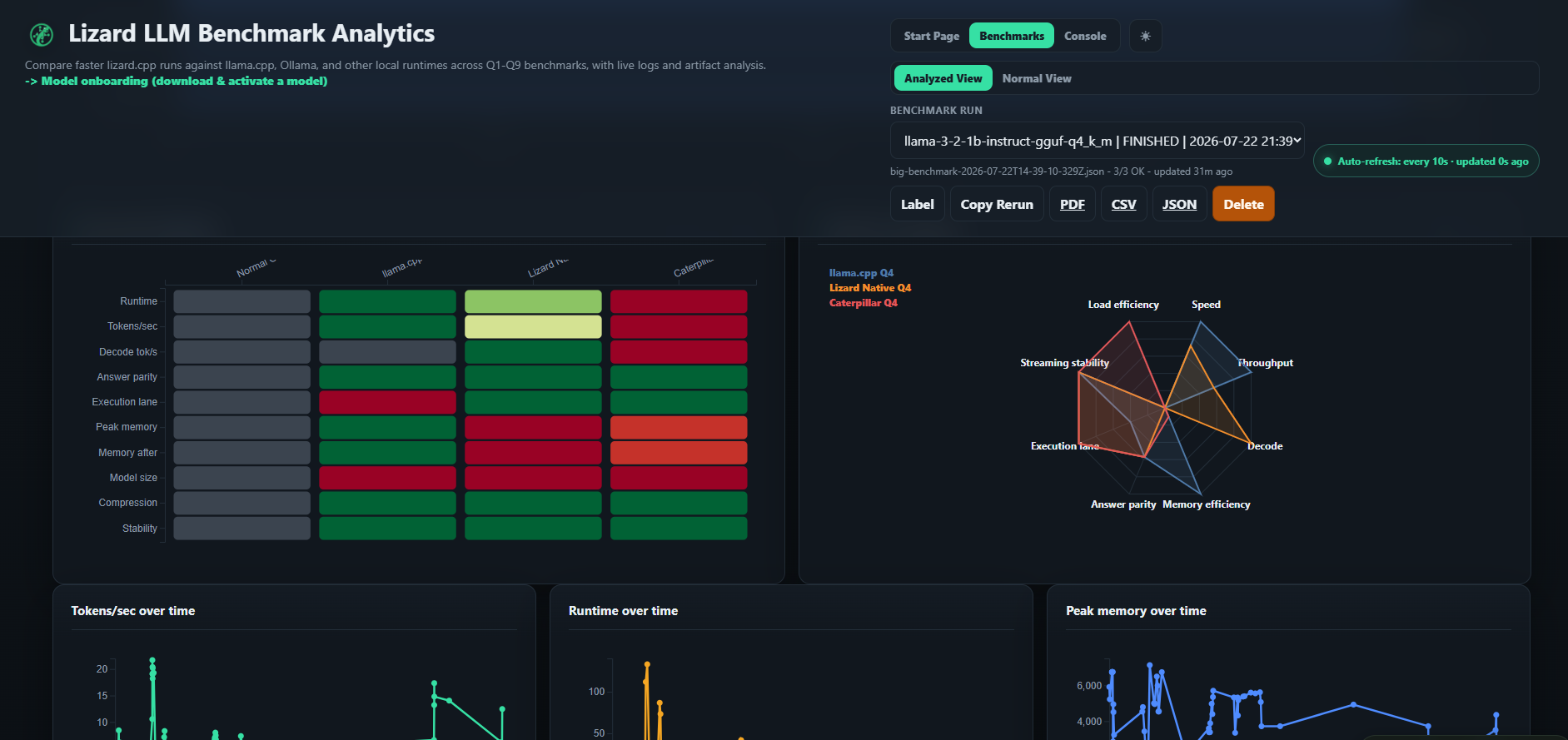
    Provider heatmap radar and history charts

    The heatmap and radar show the trade: llama.cpp leads speed and memory efficiency here, while the native lanes carry their own decode and execution-lane evidence.

    The decision guide names the real winners

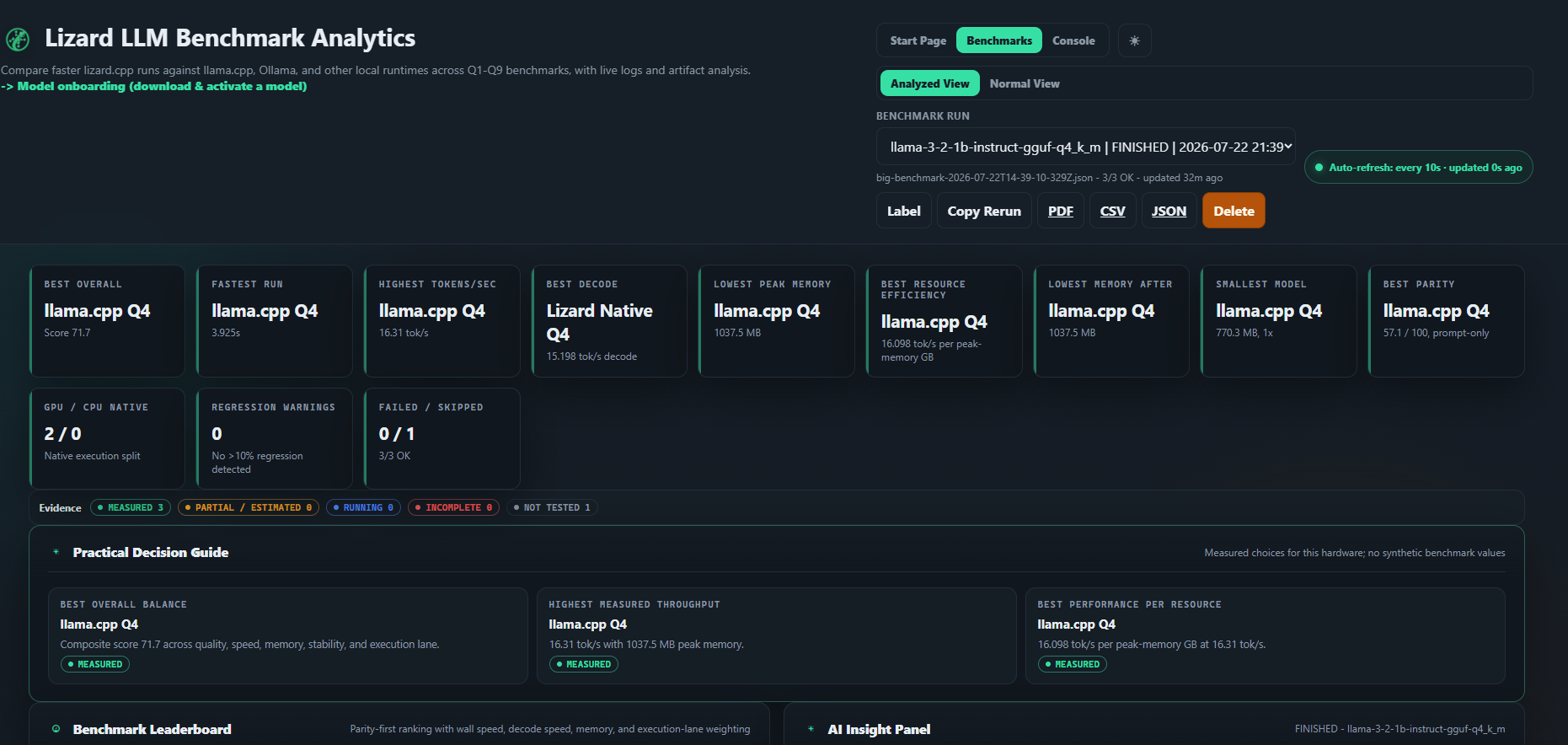
    Measured practical decision guide

    For this hardware, llama.cpp Q4 is the balanced choice at 16.31 tok/s and 3.925 seconds. Lizard Native Q4 is called out separately for best native decode at 15.198 tok/s. Ollama was not included and remains unmeasured.

    A larger model changes the gap

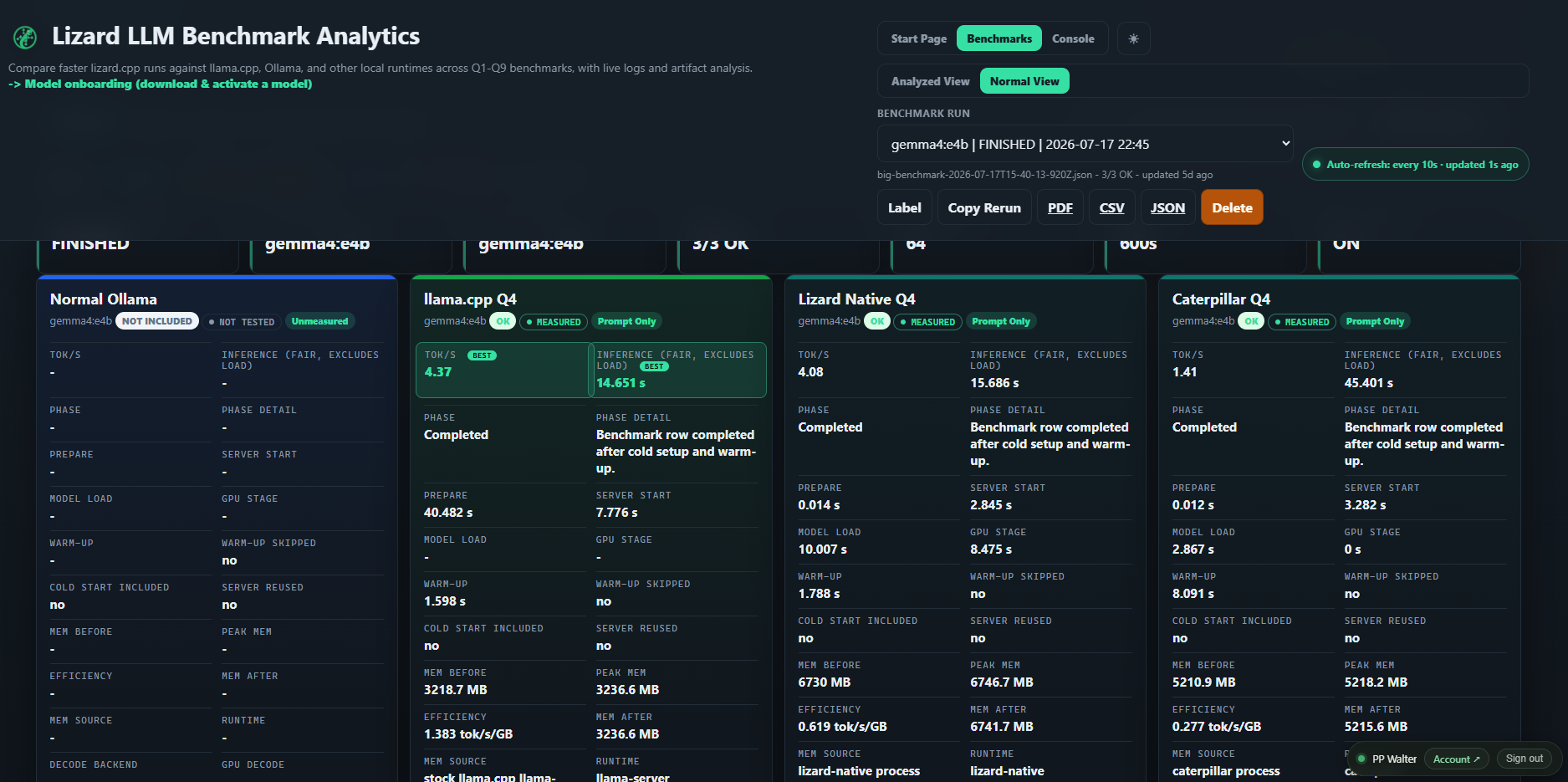
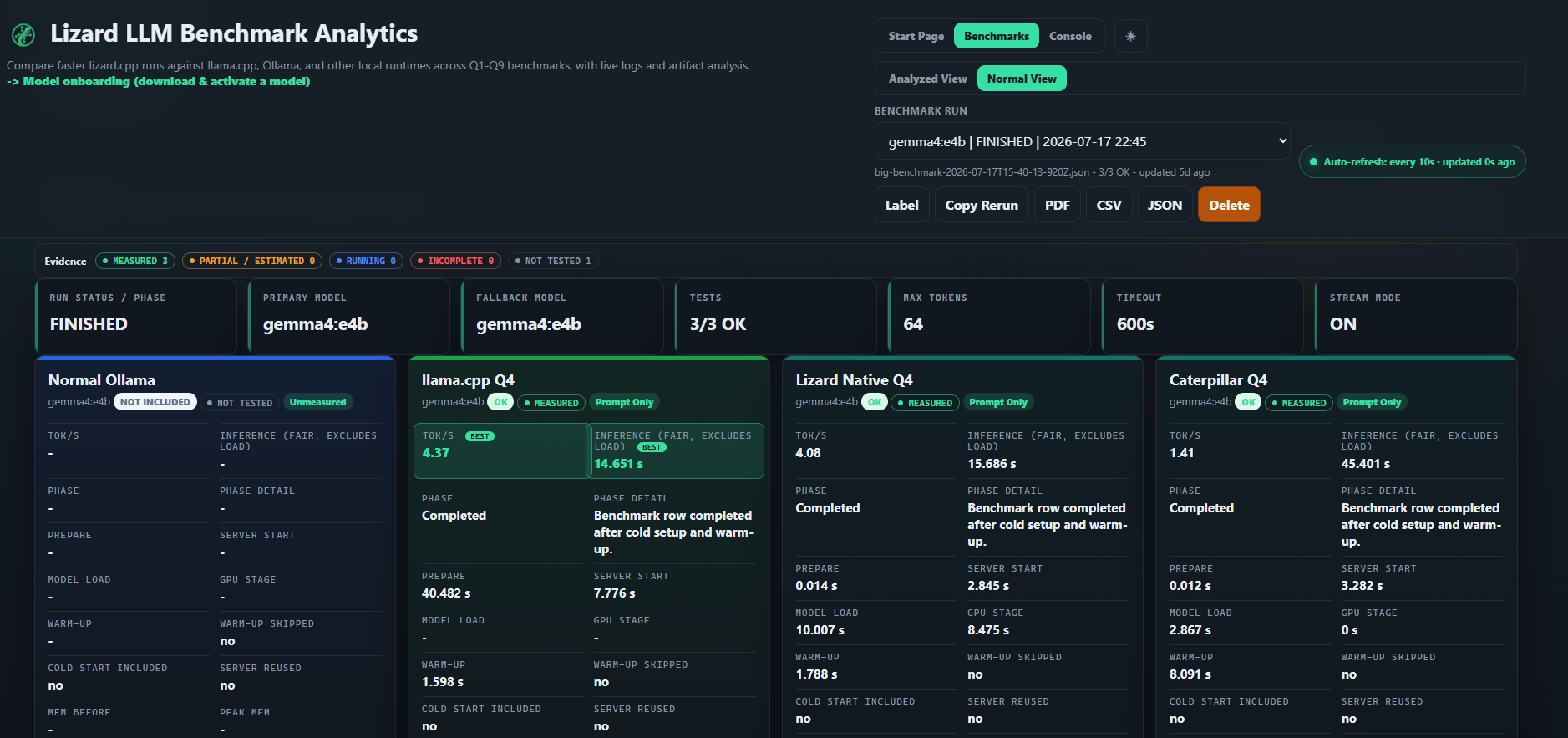
    Gemma 4 provider comparison

    For Gemma 4 E4B, llama.cpp records 4.37 tok/s, Lizard Native 4.08, and Caterpillar 1.41. The Ollama card says not included and unmeasured—not zero.

    Provider identity stays attached to every metric

    Full-width Gemma 4 provider cards

    Runtime, model load, warm-up, peak memory and efficiency stay under the provider that produced them. This is the evidence needed to evaluate Lizard as a local inference provider.


    Question for you: What hardware and model should we run next to test where Caterpillar closes the gap—or where Native's decode path matters most?


    0 0 0 Reply
  • L
    L lizardadmin
    Benchmarks
    Watch a Native, Caterpillar and llama.cpp benchmark run

    This sequence follows a provider comparison from a failed preflight to a successful run. It includes the exact command, warm-up state, partial progress and final rows, because an industrial benchmark should be reproducible and should not hide failure evidence.

    Interactive gallery: https://lizard-llm.qendryx.com/benchmarks.html

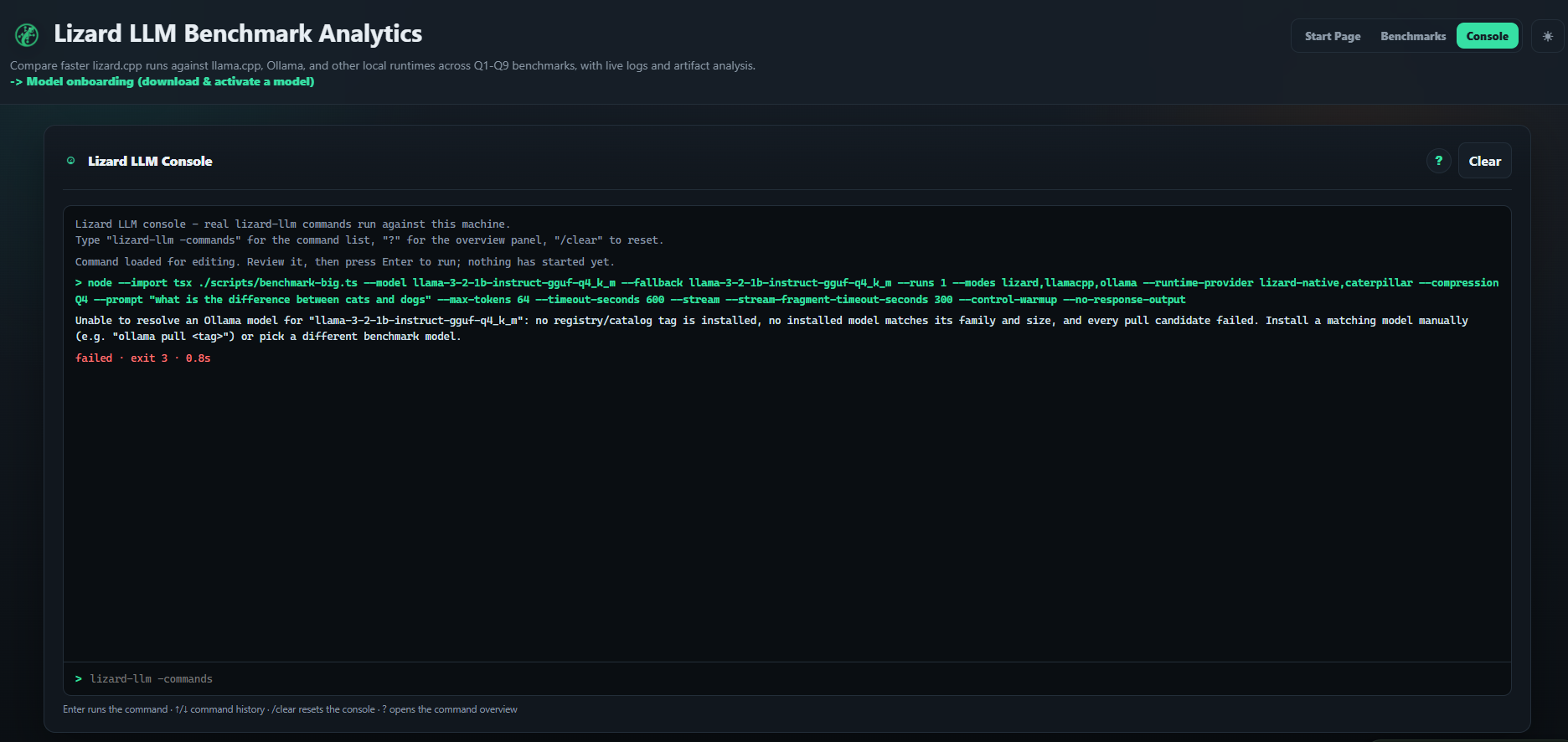
    A missing Ollama model stops before measurement

    Failed Ollama benchmark preflight

    The attempted triple-provider run exits because no matching Ollama model is installed. Lizard records the reason and exit code instead of inventing an Ollama result.

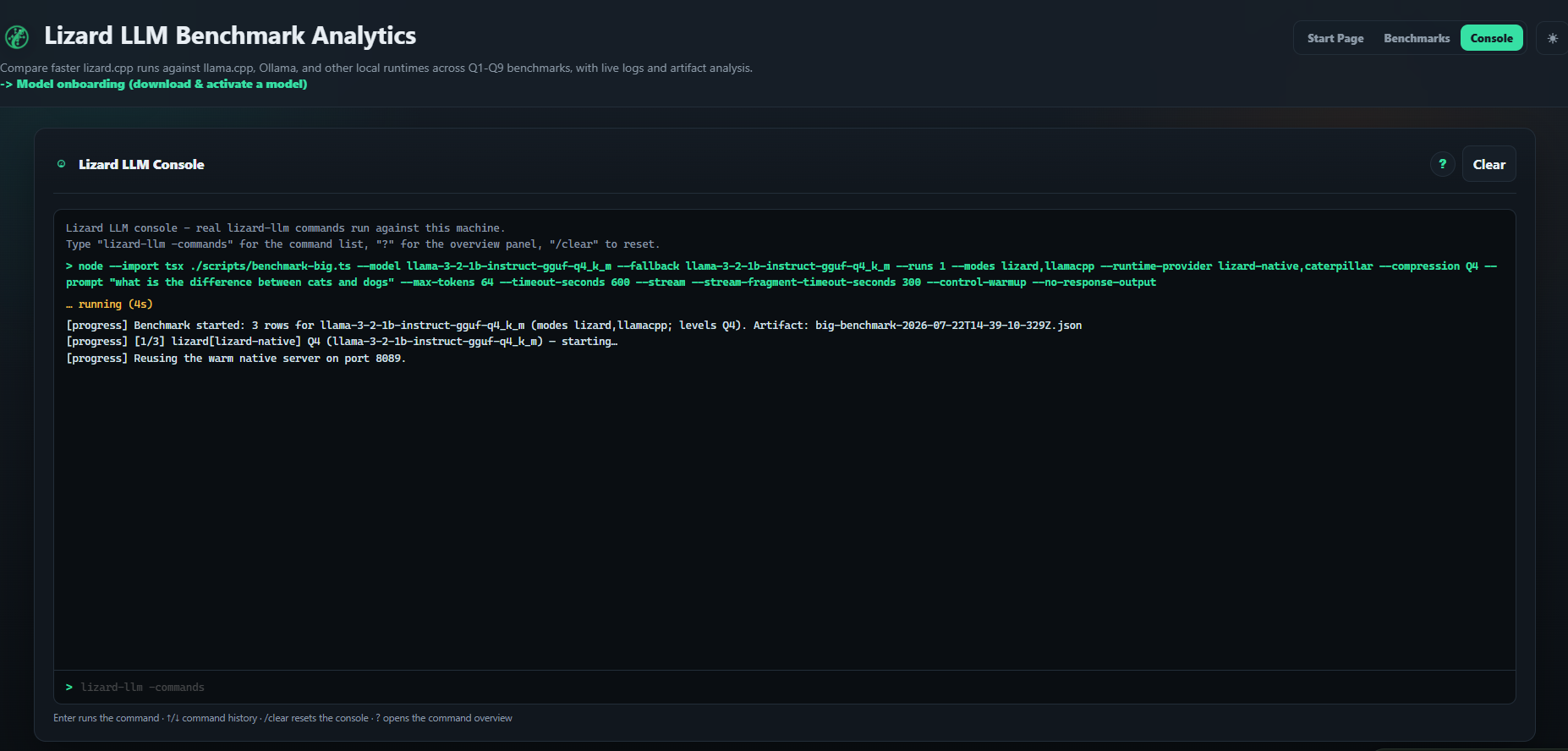
    The successful provider run begins

    Live Native Caterpillar and llama.cpp command

    The rerun shows the exact providers, quantization, prompt budget and warm-server reuse while Lizard Native starts its first row.

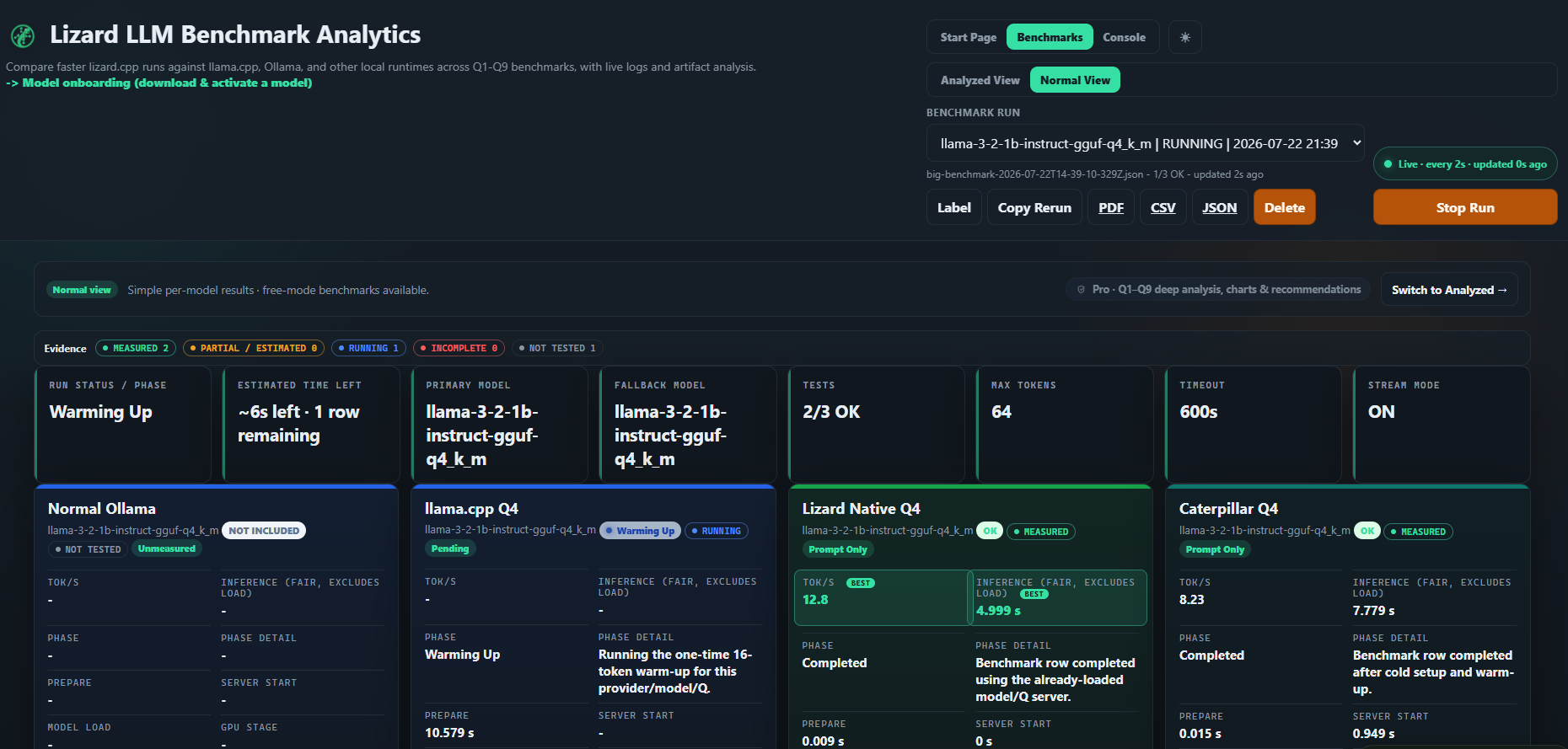
    Running and completed rows stay distinct

    Live provider cards while llama.cpp warms

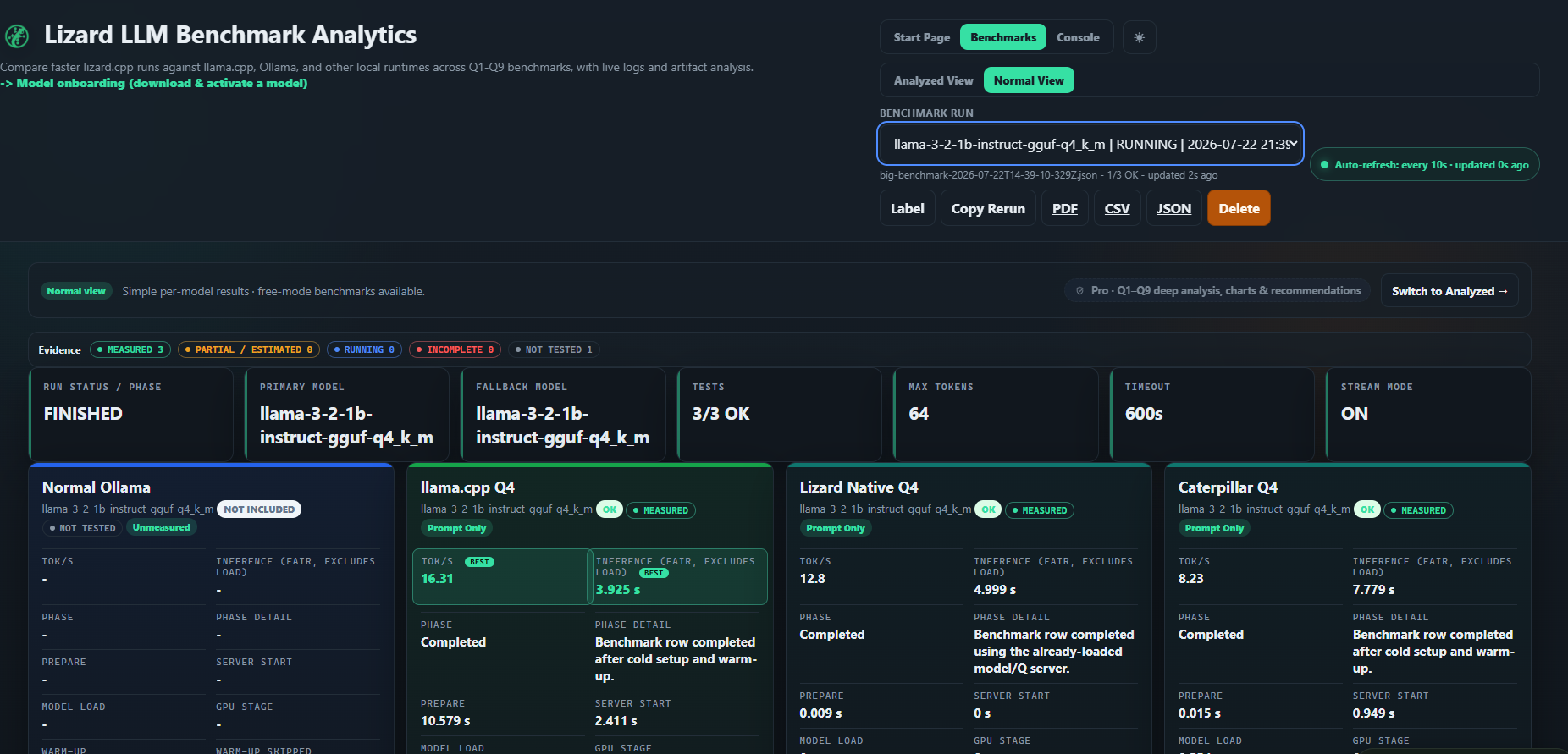
    Mid-run, Lizard Native Q4 measures 12.8 tok/s and Caterpillar Q4 8.23 while llama.cpp is still warming. A running lane is not presented as finished.

    The finished head-to-head

    Finished llama.cpp Native and Caterpillar comparison

    For this Llama 3.2 Q4 run, stock llama.cpp reaches 16.31 tok/s, Lizard Native 12.8, and Caterpillar 8.23. Setup and warm-up fields explain the wall-time difference.

    Repeatable recipes instead of hidden presets

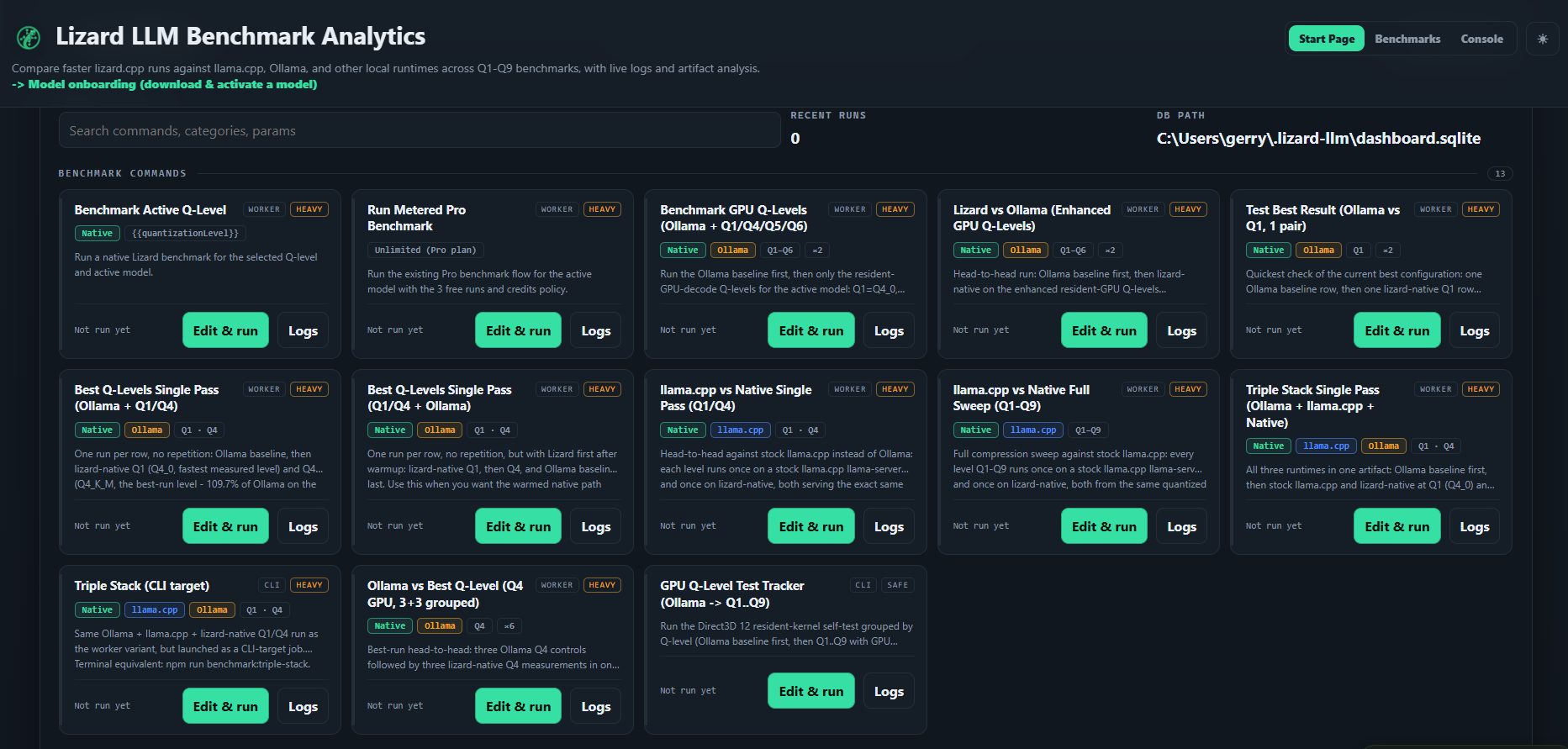
    Benchmark command recipe library

    Single-pass, full-sweep and triple-stack recipes are visible and editable. The command center makes the intended comparison explicit before it consumes a run.


    Question for you: Should the next public run include an installed Ollama baseline, and if so which exact Ollama model tag should we use?


    0 0 0 Reply
  • L
    L lizardadmin
    Benchmarks
    From GGUF selection to local inference: the benchmark setup

    A benchmark is only meaningful when the exact model file and runtime state are known. These five screens show the path from repository metadata to a locally activated model. Planning estimates are shown before the run; measured evidence is recorded later.

    Interactive gallery: https://lizard-llm.qendryx.com/benchmarks.html

    Inspect repository and compatibility metadata

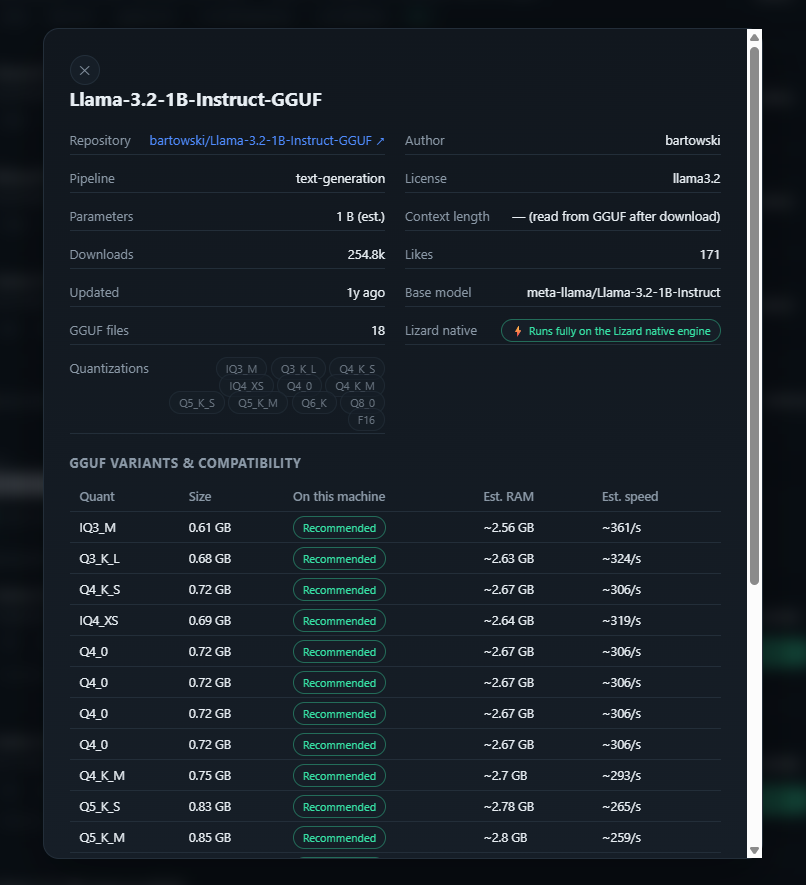
    Llama 3.2 GGUF model details

    Lizard shows the model family, author, supported quantizations and whether the file can run on the native engine before anything is downloaded.

    Choose the exact quantized file

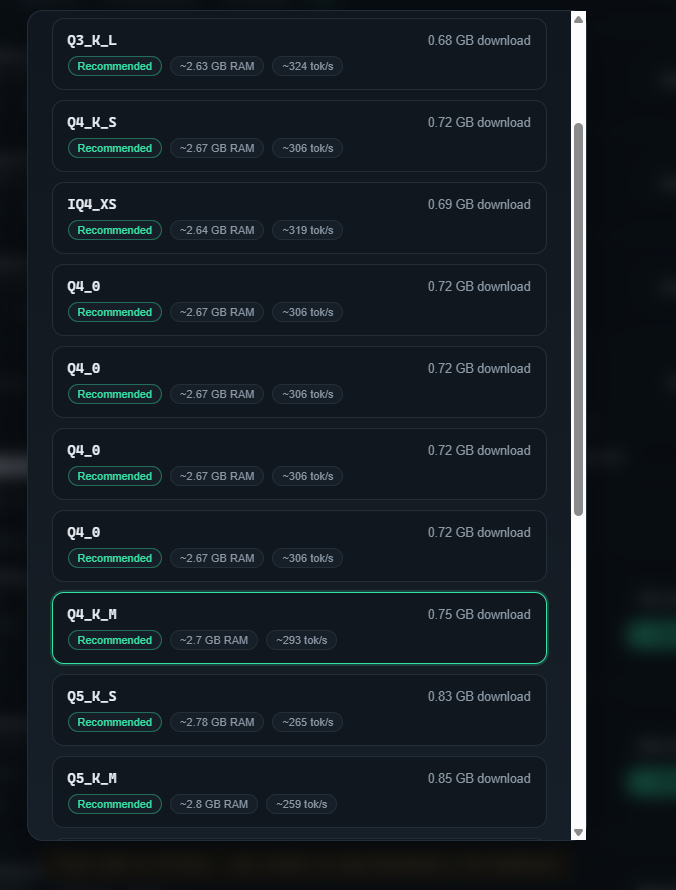
    GGUF quantization variants

    The selected Q4_K_M file has explicit download size, estimated RAM and planning speed. Those estimates are not relabeled as measurements later.

    Download identity remains visible

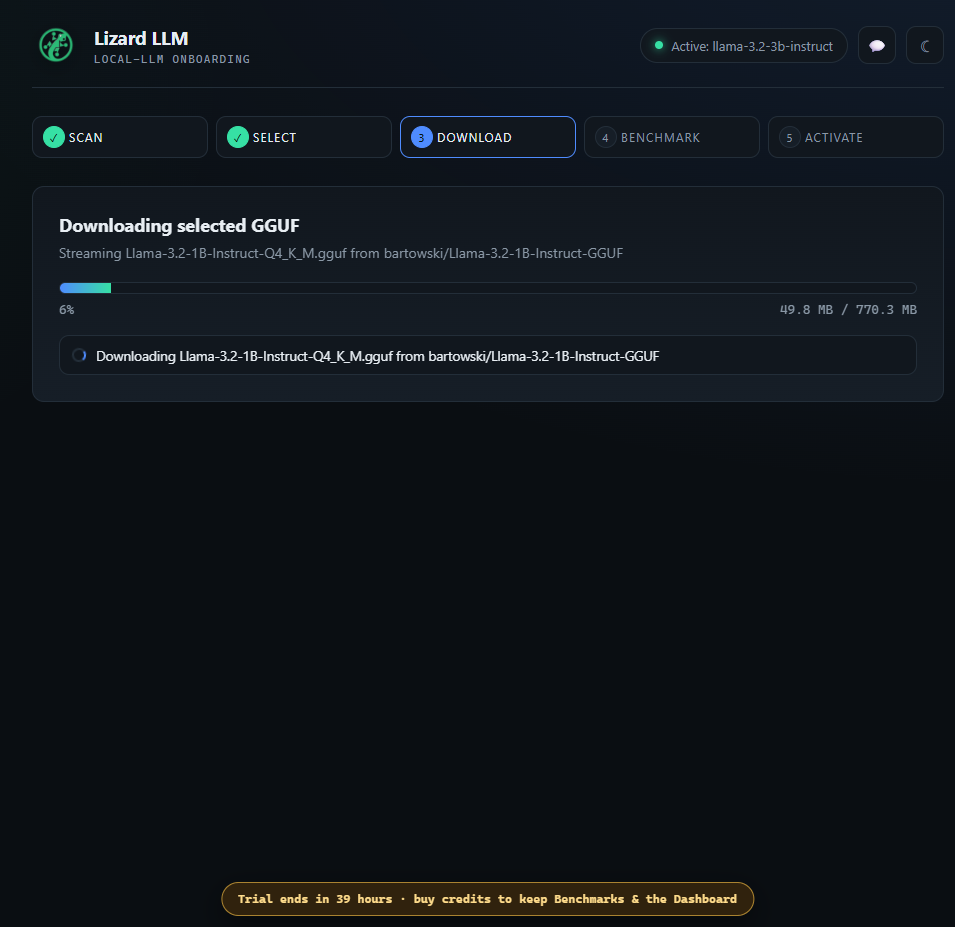
    Selected GGUF download progress

    The repository and exact GGUF filename remain on screen while the file downloads, so the later provider rows can be traced back to their intended weights.

    Cold is different from warm

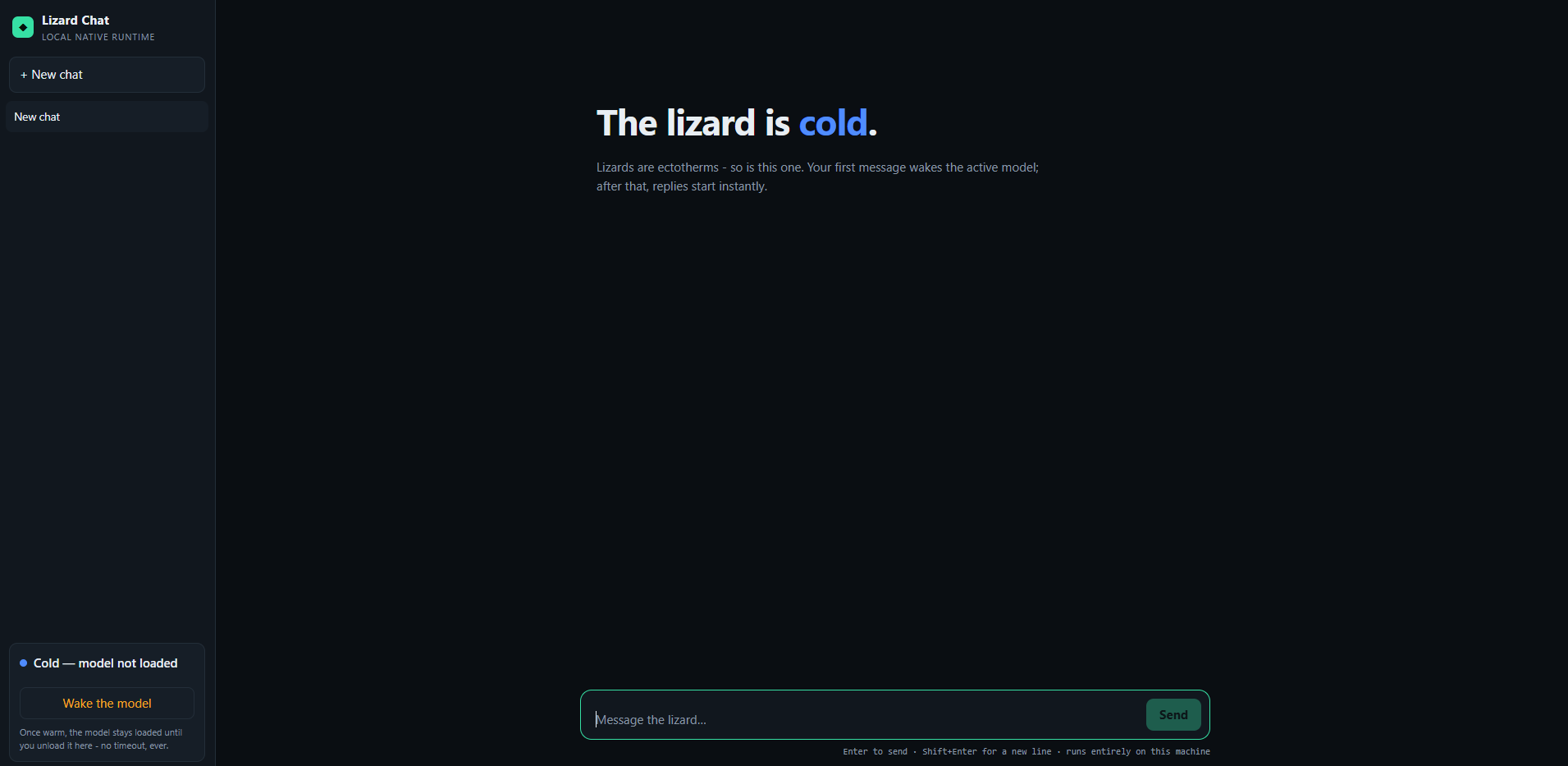
    Cold local chat model state

    The chat identifies that the model is cold and offers an explicit wake action. Benchmark load and inference timings preserve the same distinction.

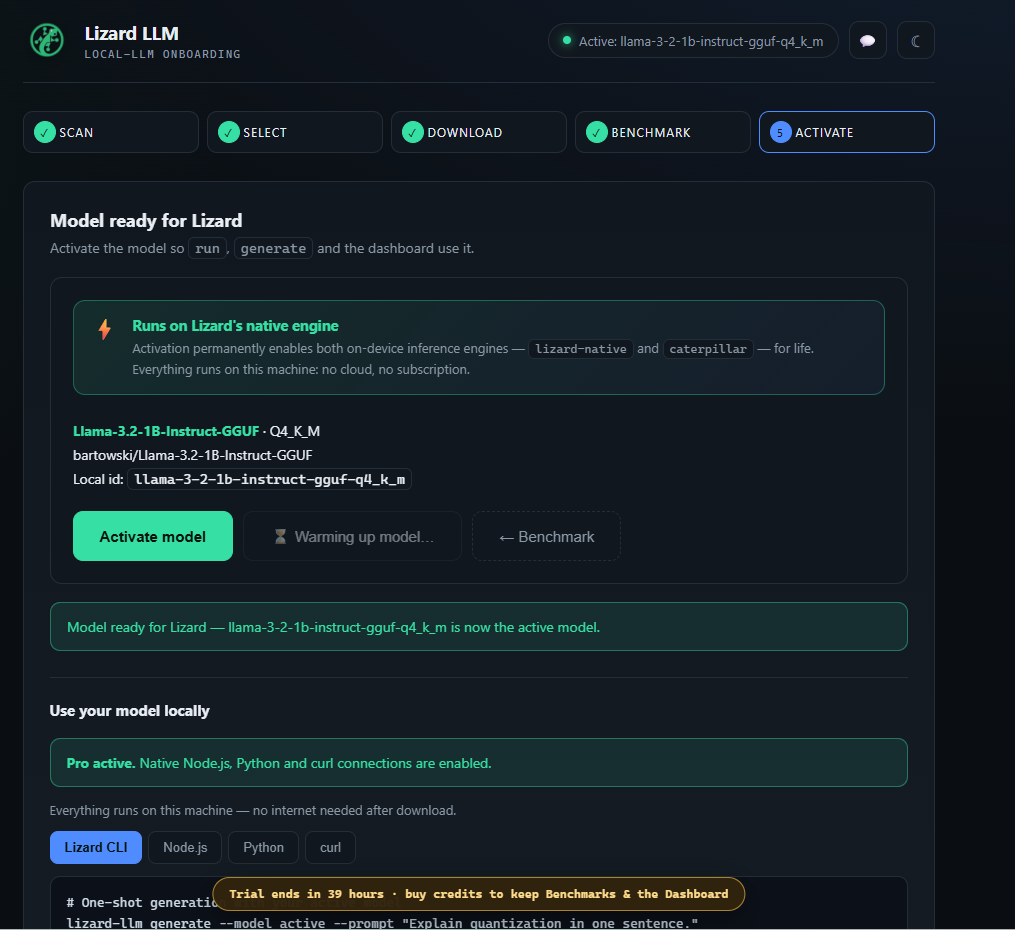
    Activate the model for local inference

    Locally activated Llama 3.2 model

    The activated model becomes available to the CLI, chat and local API. The screen names Lizard Native and Caterpillar as the two on-device engines.


    Question for you: Which model and quantization did Lizard recommend for your machine, and did the measured result match the planning estimate?


    0 0 0 Reply
  • L
    L lizardadmin
    Benchmarks
    New benchmark evidence: completed provider comparisons

    These four captures show why the dashboard keeps provider rows and analysis separate. The same machine can produce a different winner in a different run, and a composite recommendation is never allowed to erase the underlying values.

    Interactive gallery: https://lizard-llm.qendryx.com/benchmarks.html

    Five rows, five completed measurements

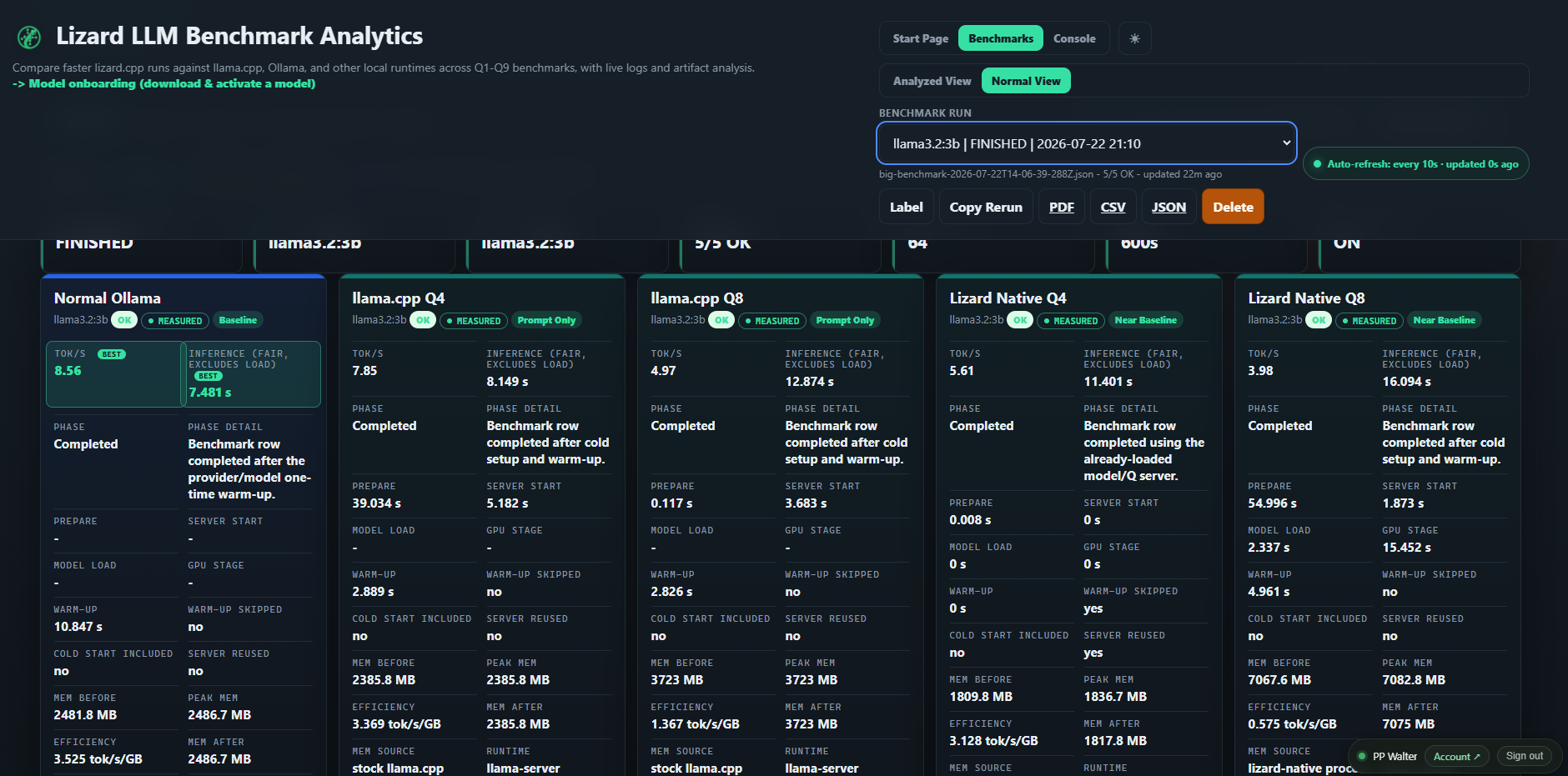
    Completed five-row provider comparison

    Ollama records 8.56 tok/s, stock llama.cpp Q4 7.85, and Lizard Native Q4 5.61 in this run. Load, warm-up and memory evidence stay visible beside throughput.

    A second run changes the order

    Expanded ten-row provider comparison

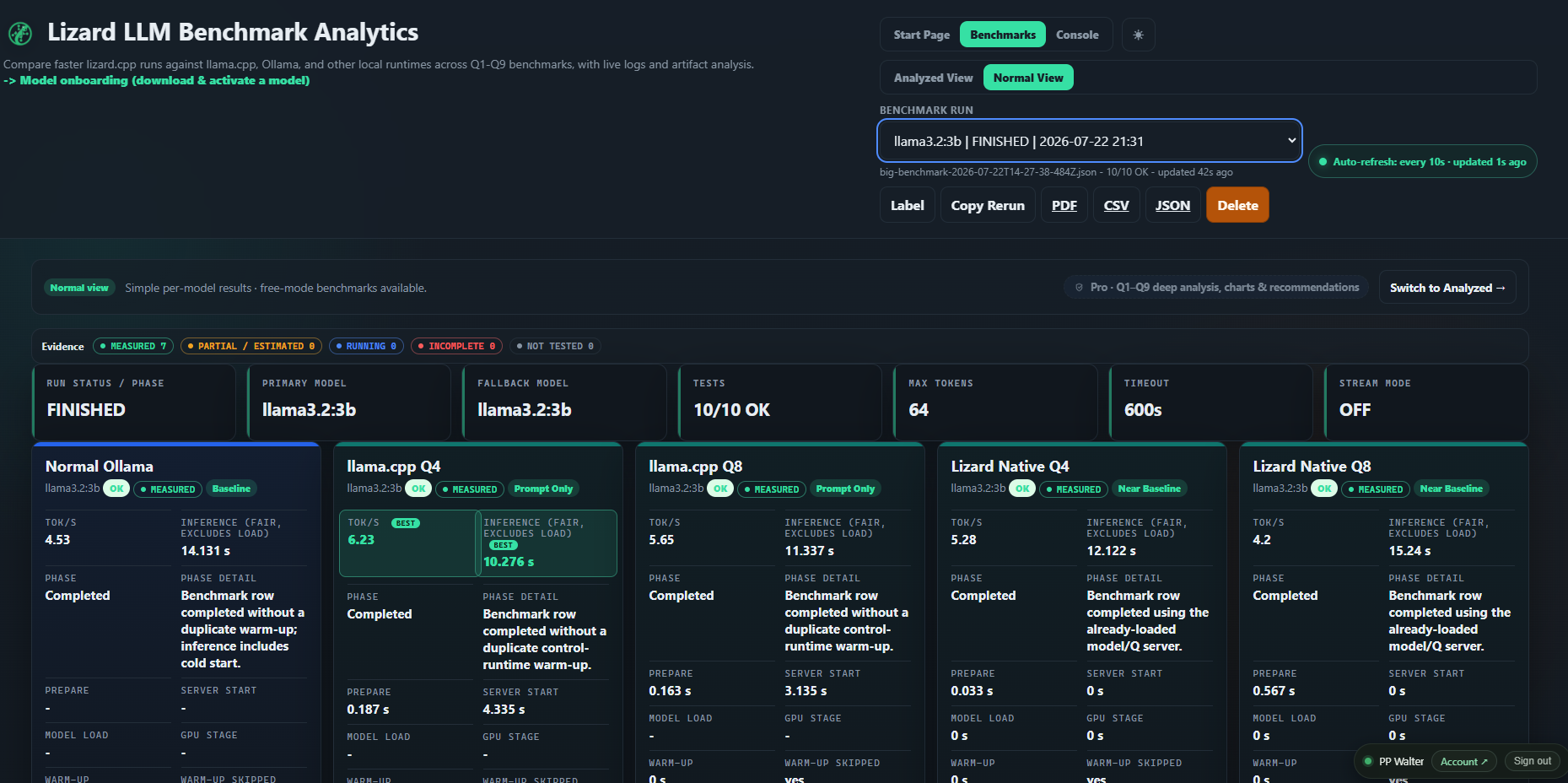
    In this separate 10/10 run, llama.cpp Q4 reaches 6.23 tok/s, Lizard Native Q4 5.28, and Ollama 4.53. The result belongs to this model, machine and run—not a universal ranking.

    Leaderboard plus metric-specific winners

    Provider leaderboard and insight panel

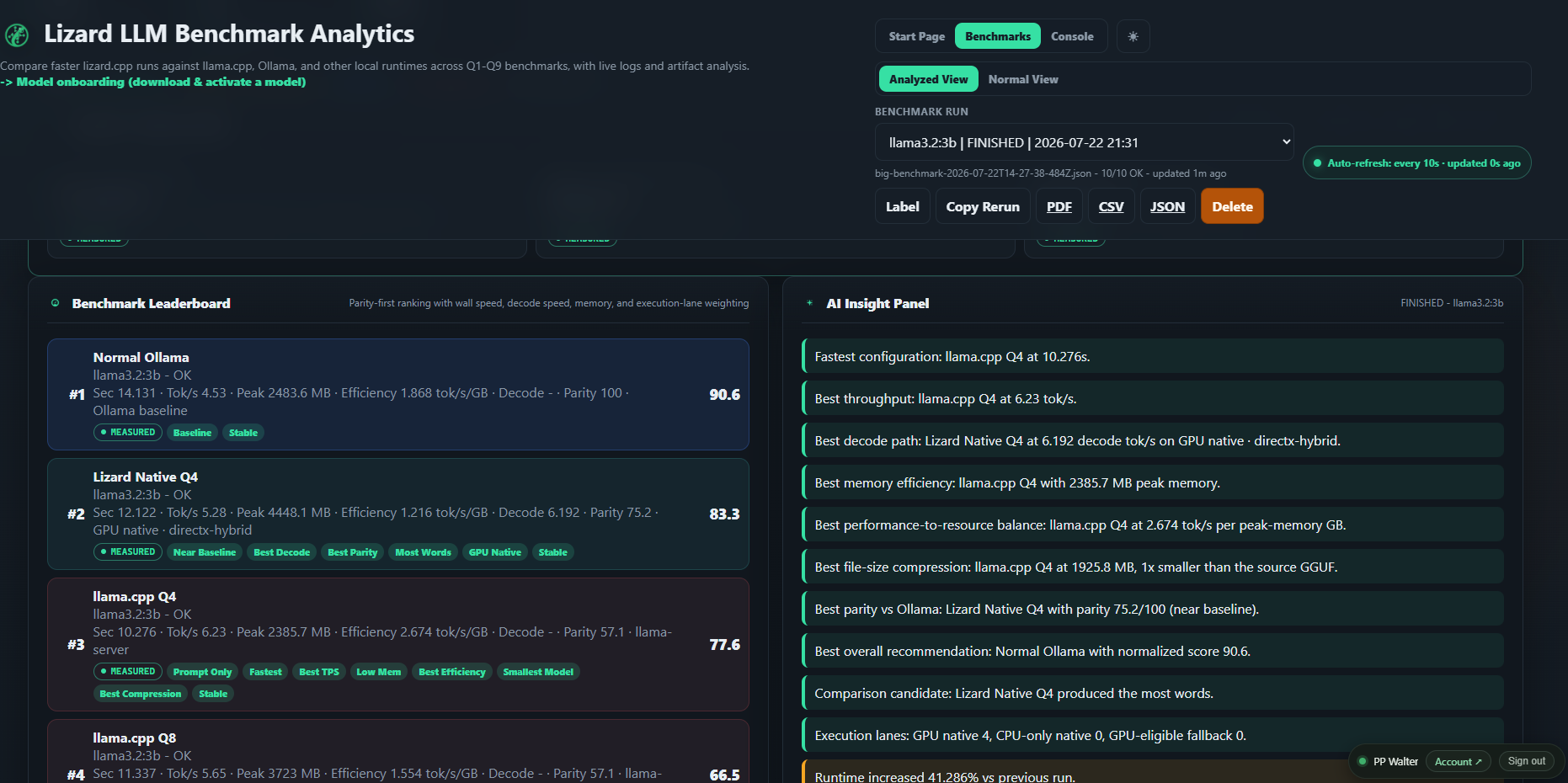
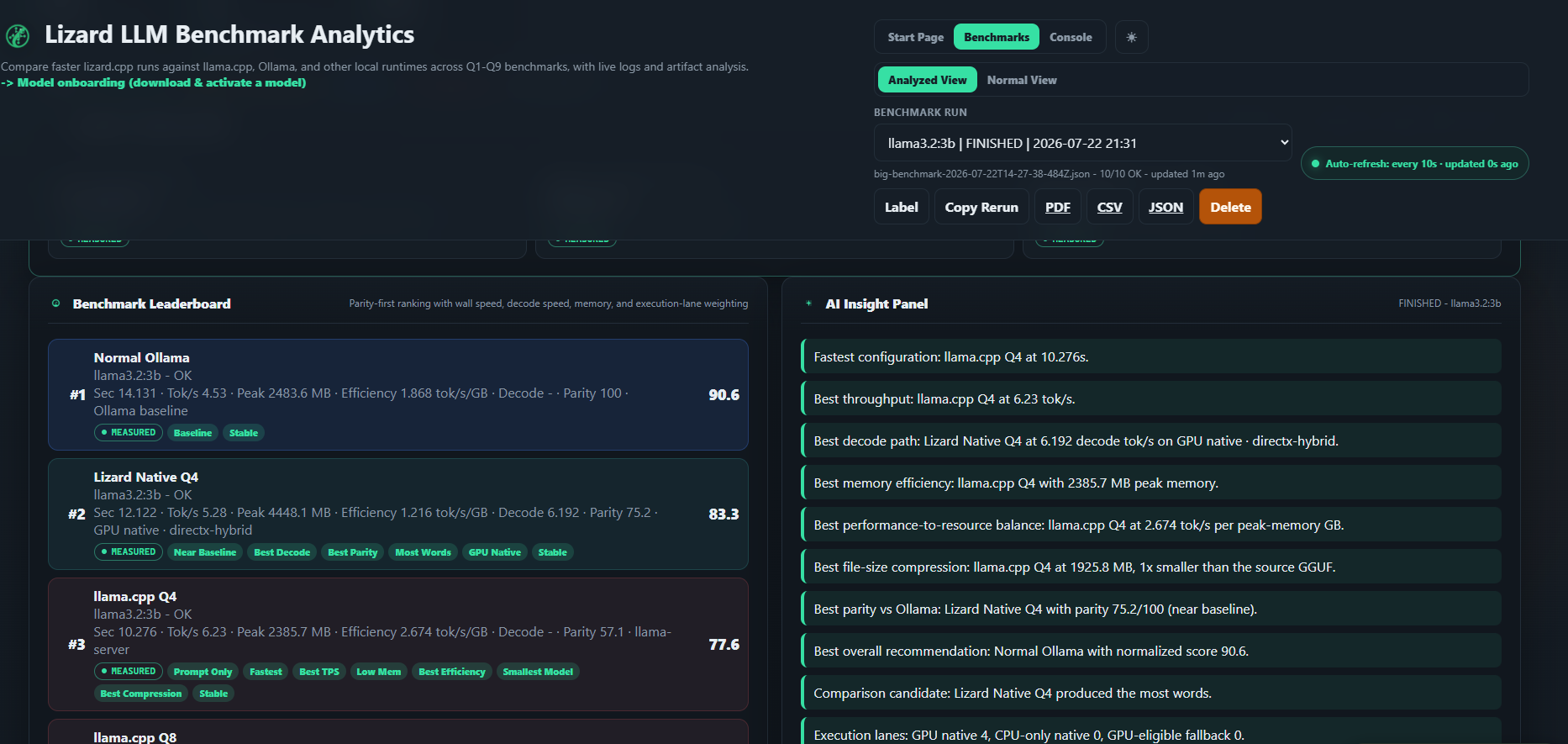
    Ollama leads the composite score, Lizard Native Q4 takes best native decode and parity among the compared rows, and llama.cpp Q4 leads wall time and end-to-end tokens per second.

    Recommendations stay attached to source evidence

    Wide benchmark leaderboard and evidence panel

    Scores, badges, execution lanes and raw provider values remain on the same screen. The recommendation annotates the run; it does not replace it.


    Question for you: On your hardware, which decision should come first: shortest wall time, steady decode speed, peak memory, or answer parity?


    0 0 0 Reply
  • L
    L lizardadmin
    Announcements
    Lizard LLM — What's New (v1.2.61)

    Lizard LLM — What's New

    Latest release: v1.2.61 · 7 Aug 2026

    188 changes across 28 releases since 10 Jul 2026, newest first.

    v1.2.61

    7 Aug 2026 · 9 changes

    • You can watch a benchmark while it runs. Until now a running test was a row that said RUNNING, and it said that for anywhere from thirty seconds to several minutes before turning into a number. Every chart on the page was drawn from rows that had already finished, so for most of a run the charts showed you the last run instead of this one. They now update while the run is happening.
    • Each chart updates at its own pace, because the things they measure move at different speeds. The live throughput trace redraws every second, the progress bars every second, time-to-first-token every two, system load every two and a half, the runtime and tokens-per-second charts every three, the heatmap every four, memory and the radar every five, model size every ten, and the history charts across runs every fifteen. A chart that cannot have changed is not redrawn.
    • Nothing flickers any more, and that turned out to be the larger fix. The page was not merely redrawing its charts — it was rebuilding itself completely, throwing away every chart and every panel and constructing them again from scratch. Three separate timers did this: one every two seconds while a run was going, one every ten seconds always, and one every minute. Anything you had open collapsed, a table you had scrolled sideways jumped back, the tooltip you were reading vanished mid-sentence, and a panel you were dragging fought you. The page is now only rebuilt when something about it is genuinely different — a row finishing, a filter changing, you switching view. In between, the numbers move and nothing else does.
    • The charts move rather than blink. A bar that grows now travels to its new length over about four tenths of a second, and each bar is tied to the row it belongs to, so when the ranking changes the bars slide past each other instead of swapping values in place. This is what makes it readable at one update per second rather than dizzying.
    • Four new charts, all from measurements the benchmark was already taking and nobody was shown. Live throughput plots words per second against the clock while the current test is answering. Time to first token shows, per test, how long you waited before anything appeared — the number you feel when you press enter, which is separate from how fast it types afterwards. Run progress shows every planned test as a bar, filling against the pace the finished tests have set. System load plots your processor, graphics card, memory and video memory for the length of the run, so a result that came out low can be checked against what else the machine was doing at the time.
    • A fifth chart answers a question the dashboard could not previously answer at all: where a test's time actually went. A test that took ninety seconds looked identical whether it spent them generating text or waiting for a model to be read off the disk. Row Time Breakdown splits each test into setup, server start, model load, graphics-card staging, warm-up and generation. The engine had been recording all six since the day it learned to time itself; nothing had ever drawn them.
    • The simple view got live charts too. Watching a run used to mean switching to the Analyzed view first. The normal view now carries its own throughput and progress charts, plus live readouts for what is streaming right now, how many pieces have arrived and how long the current test has been going.
    • The live charts exist only while a run does. When the run finishes they leave, and every timer behind them stops. A finished benchmark is a report, not a live feed, and it costs nothing to display.
    • Also fixed: the dashboard would not start at all. A duplicated line in its own source meant the page failed to load before it drew anything. If your last update left you with a Benchmarks page that never appeared, this is why.

    v1.2.60

    3 Aug 2026 · 11 changes

    • Unloading a model now sticks. Freeing memory, or pressing Unload, used to last until the next time you opened a page — the app reopened its warm-up connection on every load and quietly pulled the weights straight back in, so you watched several gigabytes come back seconds after clearing them. The app now records that you asked for the memory back and no automatic path may undo it. Anything you actually ask for — activating a model, sending a message, restoring a stopped one — loads it again immediately.
    • Benchmarks stop borrowing a model that was already loaded. Every run now clears the machine first — the chat worker, the dashboard's own server, and anything Ollama is holding — and then loads what it needs itself. Before, the app prepared a model ahead of the run and handed it over, which saved one load but could leave two copies of the same weights in memory on a 16 GB laptop. It also meant a run pinned to the processor could inherit a server that had been started for the graphics card and report the wrong lane's number. The "Preparing the selected model" dialog that used to block the whole window is gone with it; opening the Benchmarks page now tells you the active model is being unloaded and will not answer outside connections until something loads it again.
    • A new Compute setting on the Command Center, next to Transport: native hybrid (processor and graphics card) or ggml processor only. It is a run setting rather than a filter, so it applies to the command line each card will actually execute — the ones whose script understands it get --cpu-only, and the rest are pinned through the run's environment. What a card says it will run is now what runs.
    • Starting a benchmark no longer jumps to an empty page. The view switched to the Benchmarks tab on the click, but the run itself only begins once the model is warmed, about ten seconds later — so you arrived early and watched nothing happen. It now switches at the moment the run really starts.
    • The second answer in a chat starts sooner. It was never that the answer arrived in one lump — it was the silence before the first word. Each turn re-decided how much conversation memory to reserve, so the size moved up and down between turns, and the engine could not reuse the work it had already done for the part of the conversation that had not changed. On a measured conversation the second question spent 19 seconds re-reading a transcript it had read moments earlier. The size may now grow but never shrink, and while it is reading the app says how much it is reading instead of showing a bare spinner.
    • More processor does not make the graphics path faster, and we stopped asking it to. On a 4-core laptop chip, the engine was starting more workers than the machine has real cores, putting two of them on halves of the same core. Measured on a 3B model at Q4_K_M: two workers 6.30 words per second, four 7.16, six 6.90, eight 6.25. It now uses one worker per real core on that path — which is fewer threads than before, not more. The processor-only path keeps its own separately tuned count. Related: the app had been reporting hyper-threads as if they were cores, which is what led it there.
    • Asking one question on its own is about 50% faster. On the machine we measure on, a 3B model at Q4_K_M went from 6.4 words per second to around 9.6. This is the number you feel when you type a question and watch the answer appear, and it is the one Lizard has been behind on for months — llama.cpp was doing 10.4 while we did 6.4. On the same model, same prompt, same machine, we now measure 9.62 against its 9.26. That is the first time the single-question case has come out ahead rather than merely close.
    • The reason it was slow is that the engine was doing its own processor arithmetic where a better-tested implementation already existed. The part that multiplies the model's numbers on the CPU now runs on ggml, pinned to one exact upstream version that is checked at build time so it cannot drift underneath us. Lizard still owns everything around it — reading the model file, the conversation memory, batching, sampling, the server. Only the innermost arithmetic changed hands. On its own that was worth 7.0 to 9.8 words per second.
    • The engine also stopped asking the processor the same question 112 times per word. For each layer of the model it was submitting the query, key and value calculations separately, then the two feed-forward ones, each as its own scheduled job with its own thread handoff. Those are now combined into single cached plans, which on a 28-layer model removes 112 of those handoffs for every word generated.
    • Answers are unchanged, and we checked rather than assumed. Every generated word came out identical between the old and new paths across the comparison runs, and the memory used went slightly down, not up. Where an experiment did not earn its place we left it out: combining the feed-forward steps further made it slower (0.976x), so did dropping to five threads (0.992x) and removing the wait between polls (0.993x). All three are in the code, switched off, with the measurements written down.
    • What this does not change: if you send several questions at once, that was already faster than llama.cpp by roughly two to two and a half times, and this work was about not losing that while fixing the single-question case. Nothing here makes the graphics-card path quicker either — this is the processor lane.

    v1.2.59

    31 Jul 2026 · 5 changes

    • Long prompts are read about two and a half times faster. Pasting a page of notes and asking a question about it used to leave you waiting around 29 seconds before the first word appeared; it is now about 11. Short questions improved too, from roughly 3.3 to 2.7 seconds. The longer the thing you paste, the more of the wait disappears.
    • The cause was the engine converting the same data over and over. To save memory, the running conversation is stored in a compact half-size number format, and the part that decides which words matter to each other was converting it back to full size every single time it made a comparison — tens of millions of conversions for one long prompt. It now converts once per layer and reuses the result.
    • Reading a prompt now uses all your processor cores instead of one. That step had been left running on a single core while the rest of the machine sat idle, which is why it dominated the wait on longer prompts. It is now spread across the cores the same way the rest of the engine already was.
    • Position information is calculated once instead of once per attention head. The engine works out where each word sits in the sentence using trigonometry, and it was repeating the identical calculation 24 times for every word in every layer — about 15 million redundant calculations per long prompt.
    • Answers are unchanged, word for word. Every one of these is a rearrangement of the same arithmetic, and each was checked token-by-token against the previous version on the same questions, on both the GPU and CPU paths, before it shipped.

    v1.2.58

    30 Jul 2026 · 5 changes

    • The first word of an answer arrives almost immediately now. Every reply used to sit and wait until three or four words had been written before showing you any of them — a safety check that holds back the last few characters, in case they turn out to be the model signalling the end of its turn, was holding back far more than it needed to. On the machine we measured, the wait before the first character dropped from just under six tenths of a second to nine thousandths. The check still does its job; it now only holds back text that could genuinely still become an end-of-turn marker, which ordinary prose never can.
    • A long conversation no longer gets slower the longer it runs. Every message you sent was re-reading the entire conversation from the beginning before it could start answering, so each turn cost more than the one before it. Measured over five turns of one ordinary conversation, the wait before the first word went 1.4 seconds, 2.9, 5.0, 6.6, then 9.4 — by the fifth question you were waiting more than nine seconds to see anything. It now reuses the work already done for the part of the conversation that has not changed, and the same five turns wait 1.1, 2.0, 1.9, 2.2 and 2.3 seconds. The fifth question is four times quicker, and it stops growing.
    • Reading your prompt is about 40% faster. The part of the engine that reads a question before answering it was doing one row of arithmetic per worker where it could do four, so most of what it fetched from memory got used once instead of four times. Rewritten to do four, it went from 5.6 to 4.1 seconds on a deliberately long prompt with nothing cached. Word-for-word identical answers — we checked the output of both versions matches exactly, not merely closely.
    • The speed of the words after the first one is unchanged. Once an answer is flowing, it streams at the same rate as 1.2.57, and asked a single question on its own Lizard is still slower than llama.cpp — about two thirds of its rate on our machine. Everything above makes answers start sooner, which is what you notice while waiting; none of it makes them finish sooner. We would rather say that plainly than let the numbers above imply something they do not.
    • One thing worth changing outside the app: if Windows is set to the High performance power plan and you are running on integrated graphics, Lizard is roughly a third slower. The processor and the graphics chip share one power budget on those machines, so holding the processor at full speed starves the graphics side — which is where nearly all the work happens. Balanced is the faster setting here, which is the opposite of what you would expect.

    v1.2.57

    29 Jul 2026 · 4 changes

    • Unloading a model now actually gives the memory back. If you had run a benchmark, the model it loaded kept sitting in your RAM after you pressed Unload — the button said it was done, the memory said otherwise. On the machine we found this on it was holding 2.9 GB. Unload now clears it properly, and tells you if anything is still held rather than claiming success.
    • Uninstalling cleans up after itself. A working folder that can grow to several gigabytes was being left behind on your disk after the app was removed. It is now deleted with everything else, and upgrading clears it too.
    • Chat and the local API are faster when more than one answer is being written at once — two people, or one program making several requests. A single question asked on its own is unchanged in this release; we are still working on that one and would rather say so than let a headline number imply otherwise.
    • Answers come back the same as before. Everything above was checked word-for-word against the previous version on the same questions — nothing in this release changes what your model says, only how quickly and how tidily it runs.

    v1.2.56

    28 Jul 2026 · 7 changes

    • Caterpillar is now the fast engine when several answers are wanted at once — by a distance. On the same machine, the same model file and the same questions, it returns 28.8 tokens per second against llama.cpp's 9.4 with sixteen requests in flight. That is three times llama.cpp, and just over twice what Lizard's own GPU engine manages on the same run.
    • The gain arrives before sixteen. At eight concurrent requests Caterpillar reaches 15.6 tokens per second against llama.cpp's 8.7, and at four it is ahead of Lizard Native. Two people using the same local server, or one tool making several calls, is enough to feel it.
    • And the part we will not dress up: asked a single question on its own, Caterpillar is still the slower engine — 3.0 tokens per second against llama.cpp's 7.4. It is built for serving several answers at once, that is where it wins, and quoting only the winning number would tell you nothing useful about your own use.
    • Both engines now pick how many answers to work on together, rather than being told. Lizard tries sixteen at a time, drops to eight when memory is tighter, and keeps four and one as fallbacks it will use but never prefer. The decision is made from your actual free memory and the size of the conversation, so a small machine is throttled instead of pushed over.
    • Caterpillar serves the local API and Lizard Chat at the same time, from one loaded copy of the model. Chat turns and API requests join the same batch rather than queueing behind one another.
    • Requests that begin from identical prompts share the work they have already done, each on its own private copy of the conversation state. Nothing from one request can reach another.
    • Uninstalling now actually removes Caterpillar's working files. The uninstaller deleted the equivalent folder for the other engine but not Caterpillar's, which on the machine that found it had grown to 8 GB and survived a full uninstall. Upgrading clears it too, so stale launch state from an older version cannot linger.

    v1.2.55

    28 Jul 2026 · 7 changes

    • The local API server answers everyone at once. It used to take one request off the queue, finish it, and only then look at the next — so a second tool, a second script or a second person waited for the first to be completely done. It now serves up to sixteen at a time.
    • This is the release 1.2.53 said was coming. Answering several requests together is also faster than answering them one after another, because the model's weights are read once per step instead of once per request: on the same machine, same model and same questions, Lizard now returns 13.1 tokens per second against llama.cpp's 9.8 — about a third quicker, measured over HTTP with sixteen requests in flight.
    • To be plain about what that does not cover: a single question asked on its own is not yet faster than llama.cpp. The gain here is in serving several at once, which is what an API server spends its life doing, and it is the honest scope of the number above.
    • Lizard Chat gets it too, without paying for it. A lone message still takes the direct path; only a message that starts while the engine is already busy joins the shared batch. Two conversations answering at the same time now share the work instead of queueing.
    • Repeated and retried prompts reuse the prefill they already did, on a private copy. Each request gets its own writable cache, so nothing from one conversation can reach another.
    • Models with very large vocabularies load again. Gemma-family models in particular could reach the native server with their token list stripped out by an earlier compaction step, which left the server unable to read or write a single token. It now re-reads the vocabulary from the model file when it finds it missing.
    • A response the server could not encode no longer takes the server down with it. It used to commit the reply's headers before encoding the body, so a failure mid-encode killed the whole process instead of that one request.

    v1.2.54

    27 Jul 2026 · 12 changes

    • Activating a model now keeps it loaded. Before, the model was quietly released a short while after you closed the setup page, so a restart left Lizard pointing at a model that was not actually in memory. It now stays until you say otherwise, and loads itself back when the app starts — a 3B model in about seven seconds, a 14B in about thirty-six, without opening anything.
    • And a way to take it back: Activate is now one button with two states, so the place that loads a model is the place that unloads it. Freeing your own machine's memory is never gated behind a purchase, including one that has lapsed.
    • Remote and Chat are now steps six and seven of the setup rail, reachable as soon as a model is active, instead of living somewhere you had to already know about. The rail is drawn as one continuous track — solid behind what you have finished, dashed across the part activation has not opened yet.
    • Choosing a model is now split by where it comes from — Lizard, Ollama, Hugging Face and others — instead of one long mixed list.
    • Charts stay drawn. A chart you asked for now survives a page reload, an app restart and a reboot, instead of disappearing and leaving only the text behind.
    • A chart that fails is no longer dumped on you as raw data. When a small model got stuck repeating itself, the half-finished chart data was published as the answer — a wall of JSON. A failed chart is now simply a failed chart, while an answer that legitimately contains JSON still shows it.
    • "The chart library could not be loaded" is fixed. A single failed load used to break every chart for the rest of the session.
    • Renaming a chat no longer means typing the word "rename" into a browser dialog. Rename edits the title where it sits, and delete arms on the first click and commits on the second.
    • While Lizard is thinking, the waiting bubble now shows what is actually happening rather than one generic spinner.
    • Naming a document with # now hands over the document. "#notes.txt what is this about" is all common words, so the search had nothing to match on and answered with nothing — naming a file is a request for the file.
    • Signing in asks when it should. The "ask again" setting only lived in memory, so it was forgotten on restart and was never set at all if you signed out on the website. The Account badge now completes silently when you are already signed in to the app.
    • Unloading a model while chat is open now blocks the conversation with a way back to Activate, rather than leaving a transcript you can type into with nothing loaded behind it.

    v1.2.53

    27 Jul 2026 · 5 changes

    • Long conversations stop being turned away. Lizard was badly over-estimating how much memory a conversation needs to keep — by about three times — and refusing chats it had plenty of room for. It now measures properly, so conversations that used to hit a wall simply carry on.
    • Remembering a conversation takes half the space it used to, and not a word of the answer changes. A long chat that needed close to a gigabyte now needs under half of that, which leaves room for the conversation to keep going.
    • Lizard used to prepare for the longest conversation a model could theoretically hold, rather than the one you are actually having — and decided it had room for exactly one. It now plans around real conversations, so there is room for several at once.
    • Underneath, the engine learned to work on several conversations together rather than one after another. You will not notice this yet, and we would rather say so than hint at a speed-up you cannot get: the app still asks one question at a time. Opening that up is the next thing we are doing, and this release is what makes it possible.
    • When a reply is slow, Lizard can now tell you why. Each answer records what it cost the machine, which separates "this laptop is working as hard as it can" from "something is set up wrong" — previously a guess.

    v1.2.52

    24 Jul 2026 · 6 changes

    • Ask for a chart and the answer comes back with the chart drawn in it. "Show me a bar chart of my disk use", "plot the price over four months", "draw a diagram of the release steps" — the model reads your figures out of the question and picks the shape itself: bars, lines, areas, pie, scatter, or a boxes-and-arrows diagram.
    • There is nothing to switch on. No chart button, no menu, no special syntax — Lizard works out that a question wants a picture, and every other question is completely unaffected.
    • The model chooses the chart, not a keyword. Ask for a "diagram" of quarterly revenue and it will give you a line chart instead, because that is what the numbers want. It can also decide a chart would not help and simply answer.
    • Charts are drawn on your machine from a library that ships inside the app. Nothing is fetched from the internet to render them, so they work exactly the same with the network off.
    • It will not draw something misleading. A single data point, a figure it cannot read, a diagram with nothing connected: you get the written answer and no chart, rather than a picture implying data that was never there.
    • Charts follow your theme, scale with the window, and are described for screen readers.

    v1.2.51

    24 Jul 2026 · 10 changes

    • Answers start when you press send. Chat used to spend about ten seconds re-checking your hardware and your model before the first word appeared — on every single message. It now remembers what it worked out until you activate a different model: measured 10.3 seconds down to under 1.5.
    • The follow-up question that used to hang, doesn't. On the slower engine an answer could outlast the app's own memory of your setup, so the next question paid the full ten-second wait again — or appeared to freeze. That is fixed, and a test now keeps it fixed.
    • Answers stop when they are finished. Models that never send an end-of-turn marker — base models especially — used to keep writing until the budget ran out, sometimes repeating the same sentence twenty times, and you had to press stop yourself. Lizard now recognises the end of a turn, and cuts a repetition loop the moment it starts.
    • Caterpillar is usable for conversation. It re-ran your entire conversation through the engine before every reply — 46 seconds of it on a normal chat. It now keeps the conversation resident between turns: the same prompt that took 67 seconds to prepare now takes 1.4.
    • Your message appears the moment you send it, once. It used to show up twice on longer conversations, and the second copy sometimes replaced the first mid-answer.
    • A proper warm-up screen. Opening chat on a model that isn't loaded yet now shows what is happening and how far along it is, and the message box unlocks the moment the model is genuinely warm — instead of accepting a message that then sat there.
    • The engine you picked is the engine it says. Switching to Caterpillar left the old engine's name on the header and on finished answers. The label now follows the switch, and switching is refused mid-answer rather than racing the reply you are already reading.
    • Model discovery is no longer limited to "Instruct". Onboarding's Hugging Face browser now sorts models by what they actually are — base, instruct, reasoning, code, multimodal, embedding, audio, image — reads the format (GGUF, Safetensors, GPTQ, AWQ, MLX, ONNX) and tells you which Lizard engine can run each one, before you download it.
    • Upgrading no longer sends you back through onboarding. The installer used to delete the record of which model you had activated while keeping the multi-gigabyte model itself, so every upgrade left Lizard with no active model and chat unbound. Your activation now survives an upgrade.
    • A model that cannot fit your machine's memory is refused again, with the reason, instead of being loaded anyway and failing later.

    v1.2.50

    23 Jul 2026 · 16 changes

    • New: Lizard Chat — a chat app, not a test box. Conversations are saved and searchable, grouped by day, and you can pin, rename, delete or export any of them as Markdown. It opens from the tray, from the header, or straight after install.
    • Ask questions about your own files. Drop text, Markdown, CSV, logs or source files into a workspace and Lizard answers from them, citing the exact document and passage it used. Type # in the message box to aim a question at one file. The indexing happens on your machine — nothing is uploaded, and no second model is loaded to do it.
    • Workspaces. Each one keeps its own instructions, its own documents and its own settings, so "Code" can be literal and precise while "Research" cites everything. Three are set up for you; make as many as you like.
    • Type / for prompts. Nine ready-made ones — summarize, explain, review, tests, commit, rewrite, translate, table, docs — and you can write your own or replace a built-in with your version.
    • New: a free plugin marketplace. Lizard now speaks MCP, the open standard for giving a model tools, and ships a shelf of eight free, open-source plugins: read a folder, fetch a web page, query a SQLite file, read a Git history, remember things between chats. Add one, bind it to a workspace, and the model can use it. Plugins run as local processes and each one tells you upfront what it needs.
    • Whatever you activated is what answers. Chat, plugins and document search all run on the model onboarding activated — the header states which one, and the only place it changes is onboarding. No hidden model switching.
    • You can see the engine working. A live readout under the message box shows the decode rate, which backend is running and how much of the answer budget is used, and every finished answer is stamped with its measured tokens per second. Stop a long answer mid-flight, regenerate it, or edit your message and try again.
    • One chat, not two. The separate chat app on its own port is gone; the tray now opens the same workspace as everything else, sharing the already-warm model instead of loading a second copy of it.
    • Payments are live, and the price on the button is the price you pay. Every Lizard price now includes any tax that applies, so a $5 activation charges exactly $5.00 — nothing is added on the Stripe page. Your receipt itemises it.
    • You can now pay in Thai baht, with PromptPay. Thai-issued debit cards can only be charged in baht, so paying in dollars was failing outright for anyone in Thailand. Choosing baht adds PromptPay next to card — scan the QR with any bank app — and never takes the card option away.
    • The trial countdown finally tells you the truth. It used to say things like "120h left" for a five-day trial, and rounded up to "1 hour" when you had four minutes. It now reads in days, hours or minutes, whichever actually fits.
    • If you're in the trial, Lizard stops asking you to pay for what you already bought. Instead of the activation pitch, you get a thank-you, how long is left, and a direct link to the Benchmarks.
    • Go Pro no longer starts a benchmark behind your back. It used to ask for a prompt and immediately start a run — spending a credit before you'd seen the page. It now opens the Benchmark dashboard and leaves the running to you.
    • New: a short walkthrough the first time you open Benchmarks from Go Pro. It points at the real controls — where runs start, how to start one, where to watch it — and waits for you rather than clicking anything itself. Skippable, with a "don't show this again".
    • The Go Pro panel now shows what a benchmark actually produces — real comparison charts and a ranked verdict from a finished run — instead of a list of claims about them.
    • Installer: llama.cpp is fetched automatically via winget when it isn't already on the machine, so benchmark comparisons work without a separate manual install. Skipped quietly on systems without winget.

    v1.2.49

    21 Jul 2026 · 5 changes

    • Models you already installed through Ollama are no longer a dead end. Lizard now sees them, tells you which engines can run each one, and — when a model is compatible — lets you switch it to the faster native engine with one click, reusing the file Ollama already downloaded. Nothing is downloaded twice.
    • One clear model list. The same model showing up from more than one place — the curated list, a Hugging Face download, and Ollama — is now shown as a single entry with all its sources, instead of several confusing duplicates.
    • Every model now shows what it can do. Small badges tell you at a glance whether a model supports tool calling, vision, reasoning, embeddings, or long context — detected from the model itself, so what you see is what the model actually declares.
    • Big mixture-of-experts models are described honestly. Where a model only runs a fraction of itself per word (like the very large models), Lizard shows both the full size and the active size — so a large model that is actually fast reads differently from one that isn't.
    • Clearer about what runs where. When a model can't run on the built-in engine — a very large mixture model, or a non-GGUF format — Lizard now says exactly why and points you to the engine that can, instead of a generic failure.

    v1.2.48

    21 Jul 2026 · 6 changes

    • Lizard now runs on port 7817 instead of 5567. The old port is registered to other software and was clashing with it on some machines, which showed up as Lizard failing to start or the page not loading. Your existing sign-in keeps working, and if you ever need a different port you can set LIZARD_PORT.
    • New: update straight from the app. When a newer version is out, a button appears in the top-right showing which version it is. Click it and Lizard downloads the update, checks it hasn't been tampered with, closes itself, installs, and reopens at the sign-in page. Your models, chats and settings are kept.
    • New: chat is now one click from the top bar and the tray icon, and opens the full chat window — the one that warms your model, keeps the conversation and lets you unload it when you're done. The quick test chat inside setup is still there for checking a model right after activating it.
    • Fixed: a model that didn't shut down cleanly could block every later run, with no way out except reinstalling. Lizard now recognises when nothing is actually running and clears the stuck run itself; if that ever isn't automatic, a button appears to clear it, and it will refuse and tell you what's still running rather than closing something you're using.
    • The Pro section is clearer about what it costs: what a benchmark run deducts (1, 5 or 10 credits by type), that only benchmarks ever use credits, and that both engines and chat are covered by the one-time payment for life.
    • Your plan is now visible where it matters — the trial and how long is left show on the setup and benchmark pages, not just in the corner.

    v1.2.47

    21 Jul 2026 · 6 changes

    • New: chat is now one click away, and Lizard opens straight into it. A chat button sits in the top bar as soon as your model is loaded, the tray icon has a "Chat with your model" entry, and clicking the tray icon opens a conversation directly. Starting Lizard when you already have a model set takes you to chat instead of the setup steps.
    • New: an account badge in the bottom-right corner. It shows who you are signed in as and which plan you are on — trial (with hours remaining), credits, or trial ended — so you always know where you stand. Clicking it explains in plain language what your current plan includes and what it doesn't.
    • New: Lizard tells you when an update is ready. A small dot appears on the account badge; open it to see what version is available and install it in one click. Your models, chats and settings are left exactly as they are.
    • Your trial status is now visible on the page itself, not just in a corner. The onboarding and benchmark screens show what your plan includes and how long is left, so a trial can never end as a surprise while you are in the middle of something.
    • Lizard now explains what it is doing while it works. Short messages appear when a download starts, when a file passes its integrity check, when a readiness check begins and when a model is activated — including a plain explanation of what actually happened, and what comes next.
    • The Pro Mode explanation moved out of the page and into a dialog you can dismiss, so the setup steps stay uncluttered.

    v1.2.46

    21 Jul 2026 · 6 changes

    • Caterpillar decodes faster on the CPU and reads less memory per token. The four-bit weight layout was rebuilt around eight-row tiles with the scale data unpacked once at load instead of inside the hot loop, so each token now streams about 13% fewer bytes from memory and decodes around 8% faster — producing byte-for-byte identical output.
    • New: lossless speculative decoding on the CPU. When your text is repetitive or predictable, Caterpillar verifies several drafted tokens in one single pass over the model weights instead of one pass per token — up to twice the speed on that kind of output, with exactly the same tokens you'd have got anyway. On ordinary prose it steps aside automatically rather than costing you anything.
    • Caterpillar now uses your physical CPU cores by default instead of every logical thread — about 9% faster decode on a four-core laptop, and noticeably steadier timings between runs.
    • Lizard no longer thrashes on a model that's too large for your free memory. Before loading, it now measures the RAM you actually have available against what the model needs, and an oversized model is no longer pinned into shared GPU memory where it would swap constantly — it degrades to a supported path and reports the reason, instead of just running mysteriously slowly.
    • The Windows "Installed apps" list now shows LIZARD-LLM with the installed version, so the entry is easy to find when you want to update or remove it.
    • Advanced: an AVX-512 VNNI decode kernel is now available on CPUs that support it (Intel Ice Lake and newer, AMD Zen 4 and newer) behind CATERPILLAR_CPU_VNNI=1. It stays off by default — on our test hardware it measured within run-to-run noise of the standard path, so the proven default ships instead.

    v1.2.44

    21 Jul 2026 · 2 changes

    • New: a paired computer stays connected across restarts and reinstalls. Once a host has approved a client, that connection is reused until you revoke it — the client reconnects on its own when its app restarts (no need to open the Benchmark page), and a reinstall keeps the same pairing instead of forcing you to pair again.
    • New: remove old pairings. A revoked or rejected computer can now be deleted from the list — on either the host or the client — with a Delete button; an active connection is kept and can't be deleted by mistake until you revoke it first.

    v1.2.41

    20 Jul 2026 · 2 changes

    • New: remote benchmarks run over DirectX on discrete GPUs even when the model is larger than the card. On a dedicated GPU whose memory is smaller than the model, the native engine now streams weights through the Direct3D 12 decode lane instead of quietly falling back to the CPU, so the remote benchmark produces a genuine signed DirectX result. Cards that fit the model still run fully resident and fast; a model bigger than the card runs on the GPU but slower — a deliberate trade to keep it honest DirectX rather than a CPU measurement.
    • Fixed: remote pairing reconnects by itself after a reinstall. If a computer was reinstalled and paired again, its agent could stay stuck OFFLINE on the host even after approval; the agent identity is now rebound to the current install automatically, so an approved client comes online without any manual cleanup. Re-approving and re-pairing after revoking a client is also reliable now.

    v1.2.40

    20 Jul 2026 · 3 changes

    • Fixed: remote benchmarks now run on client PCs with a discrete GPU. A remote "Run selected model" on a machine with an NVIDIA/AMD card used to fail immediately with a backend error; the fixed native benchmark now runs correctly on the client's Direct3D 12 adapter regardless of which GPU it has.
    • New: Auto-run for the client. On the paired client machine you can now switch on "Auto-run" so the host's probe and benchmark requests start automatically, without confirming each one by hand — every request is still cryptographically verified and bound to your published model and adapter. Leave it off to keep confirming each run manually.
    • The installer now sets up llama.cpp for you. If llama.cpp isn't already on your PC, setup fetches it automatically via winget so the benchmark comparison lane works out of the box — nothing to install by hand. If it's already installed, setup leaves it untouched.

    v1.2.39

    19 Jul 2026 · 36 changes

    • New: remote benchmarks over the Internet. Pair a second computer to your account from the Benchmark page — the host creates a one-time code, the client enters it, and after an explicit key-fingerprint approval you can run a DirectX hardware probe and the fixed native benchmark on the remote machine, with live metrics streaming back. Both computers only make outbound connections (no port forwarding, no VPN), every request is confirmed on the remote machine, and results are signed end-to-end.
    • Fixed: switching accounts after signing out. Sign-out now also ends the account-service browser session, so the next sign-in shows the full login form and a different account can connect — previously the old account was silently signed back in.
    • Fixed: a stale model-run lock could block every new model load until reboot when Windows reused a finished run's process ID. Lock ownership is now verified against the actual process, so recovery happens automatically.
    • New: a Lizard Community forum. Sign in once with your Lizard account (the same login) and you're in — no separate registration. Browse public sections without an account, ask questions, and share what you're building. Reachable from the Community link in the top nav.
    • New: full product documentation. A dedicated Docs site explains the two native engines (lizard-native and caterpillar), the installer, and how to connect to the local OpenAI-compatible API — each page has a one-click “Copy to AI” button. Linked from the top nav.
    • Caterpillar got faster: optimized Q4_K decode and speculative decoding in the caterpillar native engine, shipped with the on-disk shader cache so loads stay near-instant.
    • Benchmark results are cleaner: the runs view now shows only the Q levels you actually selected or measured — a run over Q4,Q8 shows exactly those cards instead of a full Q1–Q9 grid — and the native lane is split by engine, so lizard-native and caterpillar appear as their own labeled cards (Ollama stays a single card).
    • The one-time activation is now $5 (up from $1) — the fixed payment/tax/processing cost made $1 unworkable. The installer, the startup screen, and the in-app Feed the Lizard dialog now show $5 and spell out exactly what it unlocks: both native engines for life (a one-time purchase, never credit-based), five days of Benchmarks included, with credits kept separate as the optional Dashboard-only currency deducted per run.
    • Caterpillar models now load in seconds, not minutes. The caterpillar engine used to recompile all of its GPU shaders from scratch on every single model load — a 60–180 second wait before the model even reached memory, repaid on every benchmark row. Those compiled shaders are now cached to disk (the same fix lizard-native already had), so the first load on a machine warms up once and every load after is near-instant.
    • Two native inference engines ship in the installer. Alongside lizard-native (the resident-GPU Direct3D 12 engine), this build bundles caterpillar — a newer standalone native engine that rebuilds the execution core around a pre-compiled compute-graph plan to cut per-token CPU↔GPU overhead. Caterpillar-provider models now run out of the box instead of reporting a missing runner binary; Lizard still picks the right engine for your hardware automatically and falls back to llama.cpp or Ollama when neither fits.
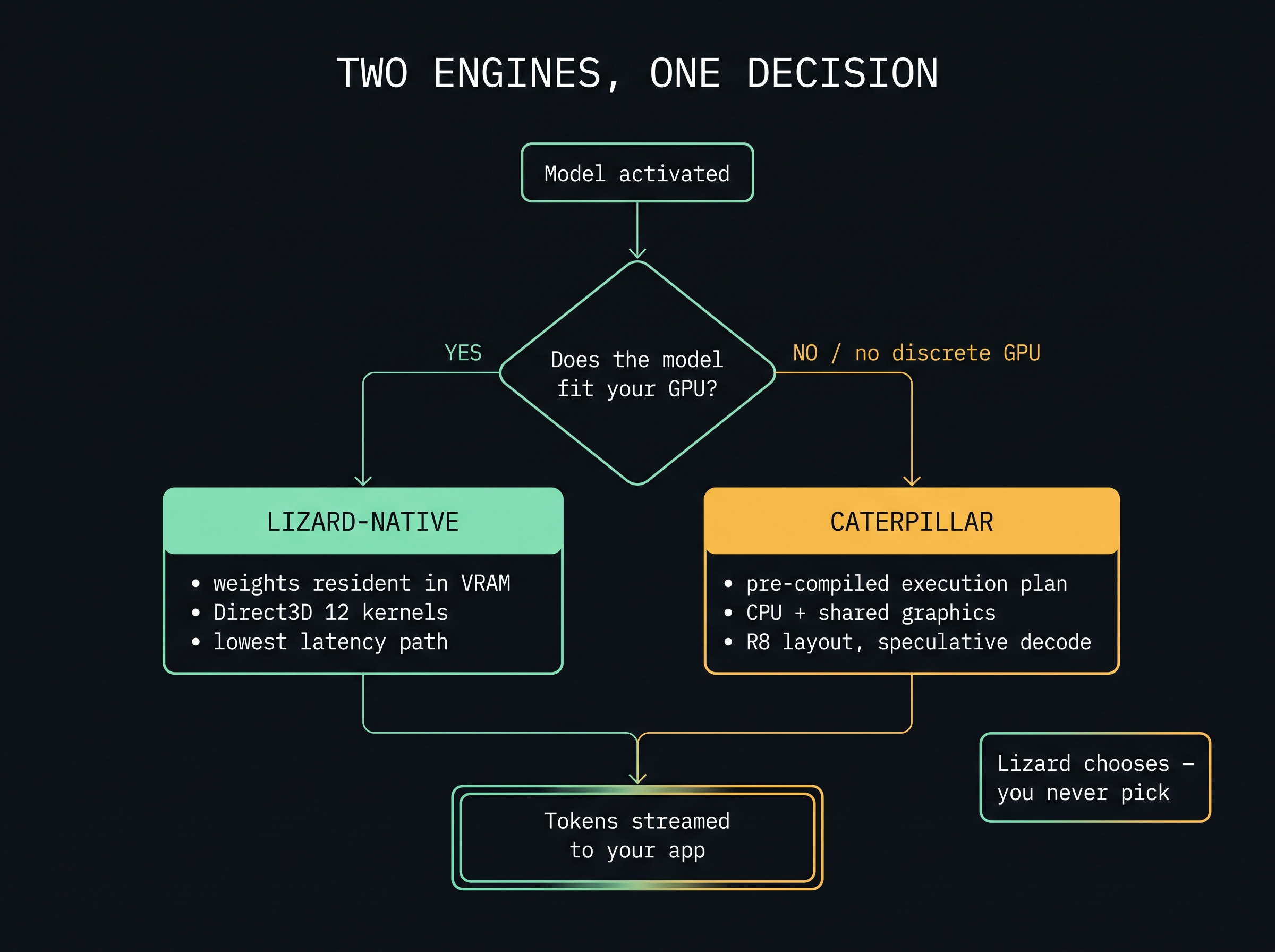
    • Native models load in seconds instead of minutes: the Lizard native engine used to spend well over a minute compiling its GPU shaders every single time it started a model. Those compiled shaders are now cached to disk, so the first native load on a machine still warms up once and every load after that — different model, different quantization, after an app restart — starts almost instantly.
    • Benchmarks now measure the model you already warmed up. Starting a benchmark reuses the model that's live and ready instead of quietly reloading it inside the run, so results reflect the warm engine and finish sooner. Force fresh still reloads deliberately when you want a clean cold-start measurement.
    • Gemma 4 (E4B) benchmarks at the Q8 level now work. They previously failed while trying to rebuild the model at that quality; Lizard now uses the correct high-precision source directly, so every quantization level completes.
    • Provider switches mid-benchmark no longer drop the run. Handing the warm model from the dashboard to a benchmark and then moving to the next engine is now race-free, so multi-provider, multi-quantization runs complete cleanly from the first row to the last.
    • Full industrial UI/UX redesign: the whole onboarding experience — Scan, Select, Download, Benchmark, Activate — got a professional control-panel visual overhaul with stronger hierarchy, consistent spacing and typography, and polished dark and light themes. Same product, same flow: every step, button and action works exactly as before, it just reads far better.
    • The Start Page is now an operational overview: runtime readiness, your latest benchmark result, and a recommended next action are visible at a glance, so you always know whether the engine is ready and what to do next.
    • Honest benchmark evidence everywhere: every performance number is labeled — Measured on this machine, Estimated from model fit, Mixed, Partial data, Running, Not tested, or Unavailable. Measured throughput is never blended with planning estimates, and missing data shows as missing instead of a fake zero.
    • A practical decision guide turns raw benchmark numbers into guidance: balanced pick, highest throughput, and best resource efficiency (tokens/second per GB, derived only when both inputs are real). Leaderboard scores and rankings are untouched — the guide annotates, never reorders.
    • The leaderboard is easier to compare: clearer ranking hierarchy, evidence badges and efficiency cues on every row — with identical scoring and ordering to before.
    • Benchmark history can now be filtered by model and run type (User readiness vs Pro benchmark), straight from the data already recorded on your machine.
    • Full keyboard accessibility: a skip link, visible focus states, and hardened dialogs — every dialog traps focus while open, closes with Escape, and returns focus to where you were. Reduced-motion preferences are respected, and status changes are announced to screen readers without spam.
    • Every failure now has a way forward: Hugging Face search, model details, benchmark history and model downloads show a clear error with a one-click Retry (and downloads add a direct path back to model selection). No more dead ends.
    • Desktop and narrow mobile layouts were validated in both themes; dense benchmark tables scroll inside their own container instead of breaking the page.
    • The Lizard native engine is now the standard runtime: benchmark and model runs on the lizard lane default to Lizard's own native GPU/CPU engine instead of stock llama.cpp. Every lane keeps its identity — Ollama rows run on Ollama, the llama.cpp comparison lane runs on stock llama-server — so comparisons finally measure Lizard native against the baselines out of the box. Explicitly selecting llama.cpp as the runtime provider still works everywhere.
    • New benchmark selector: “Run all providers over lizard-native (where possible)”, right under the Force fresh toggle. Switch it on and the llama.cpp comparison lane is also routed through the Lizard native engine (models the native engine cannot serve automatically fall back to llama-server); Ollama rows stay on Ollama because it serves its own models.
    • Onboarding now browses the entire live Hugging Face Hub, not a short built-in list: search any GGUF model by name, author or tag, filter by task type, size, popularity or “runs on my machine”, and see at a glance whether each one is Recommended / Runs Great / Runs Well / Too Large on your exact hardware — with estimated memory and speed — before you download anything. Open full model details, then pick the quantization you want. Lizard-verified, tuned models stay pinned on top.
    • Any GGUF model on Hugging Face can now be downloaded and run — not just the curated ones. The model’s details are read straight from the downloaded file, so a model you found yourself benchmarks and serves exactly like a built-in one. Files that can’t run on their own (vision adapters and multi-part split downloads) are filtered out so you never pick one by mistake.
    • Benchmarks no longer hammer the system with a constant background process scan. A Windows diagnostic that used to run about 20 times a second for the entire time a model was loaded — indefinitely for the local API server — now runs a handful of times and then backs off, removing a steady source of CPU/WMI load (and system stress) during every run.
    • The app recovers cleanly after a crash, forced restart or blue screen. A model left “loaded” by a previous Windows session is now recognized as gone the instant you reboot, so benchmarks and model loads no longer refuse to start with a stale “another model is already loaded” error and no longer need any manual cleanup — while a model that is genuinely still running this session is still correctly protected.
    • Uninstalling now actually cleans up: downloaded models, the model catalog, dashboard/runtime caches, logs and support bundles under the app's local data folder are removed on uninstall, while your sign-in, license, benchmark credits and benchmark history are kept so a reinstall picks you right back up — no re-download, no re-login, no stale leftovers.
    • A model that finished or crashed on its own is now recorded as stopped instead of wedging the app: previously the next benchmark or model load failed instantly with "descendant-tree termination was not proven" and stayed blocked until manual cleanup. Lizard now proves from recorded process identity (PID + start time) that everything really exited — including when Windows hands the old PID to an unrelated program — and only refuses when something is genuinely still holding memory.
    • Crashed model servers whose leftover process ID was recycled by Windows into an unrelated app (a browser helper, an editor) no longer read as "a model is still loaded": residency checks now use PID + start time as identity, so a recycled PID can never permanently block future loads — and Lizard will never try to kill the innocent process that inherited the number.
    • Benchmarks no longer get permanently stuck after one run is interrupted: if a run crashed or was stopped mid-model, every later run used to refuse to start with "refusing another load," and a single failed quantization level cascaded into failing all the rest. Lizard now verifies that nothing is actually still loaded and cleanly recovers instead of blocking — no more deleting lock files by hand.
    • The benchmark "stopped updating for more than 45 seconds" message is now accurate: it says whether the run actually exited or is simply still working, so a healthy long generation is no longer mislabeled as an early failure.
    • Feed the Lizard now opens with a 16-second cinematic explainer video instead of the old 3D animation — same character, clearer story: feed once, hardware scan, model pick, and what the $5 payment unlocks.
    • Feed the Lizard: a one-time $5+ activation (Stripe Checkout, a purchase, no subscription) permanently unlocks both native inference engines for life and includes five days of benchmark access. Credits are separate — the Dashboard's optional currency, deducted per Benchmark run; the native runner is never credit-based. Rolling out gradually in test mode while production verification finishes.

    v1.0.17

    12 Jul 2026 · 4 changes

    • The native local API server's replies were carrying several megabytes of unrelated internal diagnostic data on every single response — trimmed so a normal chat reply is just the reply, over 400x smaller.
    • The native local API server no longer looks stuck during a slow response: it now sends a steady heartbeat while a model is loading or generating, instead of returning nothing until the very end.
    • "lizard-llm generate" could occasionally come back empty for a model whose token metadata confuses llama.cpp's vocab loader; it now detects that and retries automatically instead of silently returning nothing.
    • Benchmark Leaderboard: llama.cpp results now rank correctly alongside Ollama and Lizard runs instead of being left out, and "fastest"/"smallest" no longer get awarded to a metric that simply doesn't apply to that run (e.g. Ollama's file size).

    v1.0.16

    12 Jul 2026 · 5 changes

    • Llama-family models decode up to 2x faster: Q/K/V projections and the whole feed-forward block now each run as a single GPU submission instead of five, measured at +92% tokens/second on Llama 3.2 3B (Q4) and +55% on Q8 — with byte-identical output.
    • Long prompts on Llama models process about 3x faster: prompts now prefill in one batched pass per layer instead of token by token, cutting a 55-token prompt from ~7.5 s to ~2.1–2.6 s before the first word appears.
    • Gemma models decode 13–26% faster and start responding ~20% sooner: the whole-token GPU graph no longer rebuilds its ~400 weight descriptors every token, and shared-memory GPUs (like Intel Iris Xe) are correctly allowed back onto the fast single-submission decode engine.
    • The Q8 benchmark level is now true 8-bit quality: it runs real Q8_0 quantization on the GPU decode lane (near-lossless reference quality) instead of the old experimental 2-bit ternary compression that degraded answers by design.
    • GPU attention got a rewritten, bit-exact kernel: 8 positions per barrier pass with staged coalesced loads — attention stage time down 22%, verified bitwise-identical against the previous kernel across every shape.

    v1.0.14

    11 Jul 2026 · 1 change

    • Stripe checkout and billing hardened end to end: idempotent webhook fulfillment, safer delivery logging, and account state that stays consistent across reinstalls and repeated events.

    v1.0.13

    11 Jul 2026 · 3 changes

    • Small GPUs no longer thrash: on a 2 GB dedicated-VRAM card, Lizard used to repeatedly evict and re-upload model layers during decode once a model outgrew the card's usable memory — sometimes crawling below 1 token/second. Prefill and decode are now planned independently, so the fast GPU-assisted prompt stage is kept while decode falls back to a stable path instead of thrashing.
    • Faster CPU-only inference on modern processors: Lizard now builds and safely selects an AVX2/FMA-optimized worker on CPUs that support it (with a startup self-test and automatic fallback to the portable baseline), instead of always using the lowest-common-denominator build.
    • Test Your Model now shows exactly what ran: the selected GPU, which CPU worker was used, the prefill and decode backends, live GPU memory and eviction counts, and which hardware profile was calibrated as the fastest safe option for your machine.

    v1.0.12

    11 Jul 2026 · 2 changes

    • More reliable GPU selection on laptops with two graphics chips (integrated + dedicated): Lizard now identifies the exact same GPU from hardware detection through to actual inference, instead of occasionally planning for one chip and running on the other.
    • Safer GPU memory budgeting: the amount of a model kept on the GPU is now checked live against what the graphics driver currently reports available, so other running apps or a busy system can no longer push Lizard past a safe limit.

    v1.0.11

    11 Jul 2026 · 4 changes

    • Sign-in now unlocks the app immediately: after connecting your account in the browser, the redirect back to the app carries your session — no more landing on the locked “Connect your account” screen after a successful sign-in.
    • Registration made recoverable: if creating your account takes longer than the secure sign-in window, you now get a clear retry page and the next click completes instantly — no more dead-end error after signing up.
    • Sign-in “Missing or invalid CSRF token” error fixed: every in-app action (model activation, analysis, downloads, chat) now carries the session security token automatically, and stale sessions refresh and retry on their own.
    • GPU decode reliability: when a model is larger than your GPU’s usable weight budget (2 GB dedicated-VRAM cards, or busy shared-memory systems), Lizard now automatically splits the flow — GPU-assisted prompt processing plus bounded hybrid decode — instead of failing with a Direct3D 12 decode-lane error in Test Chat.

    v1.0.10

    11 Jul 2026 · 2 changes

    • CPU compatibility fixed: Lizard now ships a portable x86-64 native worker instead of a binary tuned to the build PC, preventing STATUS_ILLEGAL_INSTRUCTION crashes on older Intel and AMD processors.
    • Accounts from 1.0.8: on first launch the app opens a branded "Connect your account" screen — sign in (or create an account in under a minute) through your system browser, and the app unlocks.

    v1.0.8

    10 Jul 2026 · 4 changes

    • Local-first, still private: signing in only exchanges your identity to authenticate you. Your prompts, model files, hardware details and benchmark data never leave your machine.
    • Sign out any time from the in-app control; the local dashboard locks until you sign back in, so an unattended machine can't be used without your account.
    • Secure by design: OAuth 2.0 with PKCE in your system browser (no password is ever typed into the app), tokens protected by Windows DPAPI, and the dashboard stays bound to 127.0.0.1 only.
    • From 1.0.7: interactive Console page, full built-in command overview, and live command output streaming — all now behind your account.

    _Download the latest build: https://lizard-llm.qendryx.com/download_


    0 0 0 Reply
  • L
    L lizardadmin
    What are you building?
    Feature requests and rough edges

    If something is missing or awkward, this is the place.

    Most useful framing is what you were trying to do and where it got stuck — that tends to lead somewhere better than a specific solution would, because the underlying problem is often fixable in a way nobody had thought of.

    Bugs are welcome here too. Include:

    • What you did
    • What you expected
    • What happened instead, with the exact message

    Recent changes that came from exactly this kind of report: models that were too big for a card used to silently thrash instead of saying so, and a model that failed to shut down cleanly could block every later run with no way out but restarting. Both are fixed.


    0 0 0 Reply
  • L
    L lizardadmin
    Caterpillar
    Advanced: the AVX-512 VNNI option, and why it's off

    For anyone who likes the details.

    Modern Intel (Ice Lake and newer) and AMD (Zen 4 and newer) processors have an instruction that does 8-bit integer maths faster. Caterpillar has a kernel that uses it, behind CATERPILLAR_CPU_VNNI=1.

    It ships disabled, and the reason is worth stating plainly: on our test hardware it measured within run-to-run noise of the standard path. Not faster, not slower — indistinguishable. Shipping it on by default would be claiming a win we can't demonstrate.

    It may well help on other chips, particularly ones with more memory bandwidth. If you try it:

    CATERPILLAR_CPU_VNNI=1
    

    Please post your CPU and both numbers, run back-to-back. Alternating measurements matter here — machines get hotter as you test them, and that alone can swamp the difference.


    0 0 0 Reply
  • L
    L lizardadmin
    Architecture
    Two engines, one decision: how Lizard routes your model

    Lizard ships two execution engines and picks between them for you. This is the part people ask about most, so here is the actual decision.

    Two engines, one decision

    The question it asks is simple: does this model fit in your GPU's memory, alongside the KV cache and everything else already on the card?

    If yes → lizard-native. Weights go resident in VRAM, work runs through Direct3D 12, and this is the fastest path available on your hardware.

    If no, or there is no discrete GPU → caterpillar. This is the newer engine, built around a pre-compiled execution plan rather than interpreting a graph each token. It is designed for the case most benchmarks ignore: a normal laptop with integrated graphics.

    A few things worth knowing about caterpillar specifically, because they are unusual:

    • The weight layout is the optimisation. Decoding is memory-bound, so the win came from reading fewer bytes per token, not from doing arithmetic faster. Restructuring the four-bit weight layout into eight-row tiles cut bytes-read per token by about 13% and decode time by about 8% — with byte-identical output.
    • Speculative decoding is lossless. On predictable text it drafts several tokens and verifies them in a single pass over the weights, then keeps only the ones the real model agrees with. Same output, fewer passes. On ordinary prose the acceptance rate drops, so it stops trying rather than making you pay for failed guesses.
    • Physical cores beat logical threads. Because the limit is memory bandwidth, using every hyperthread adds contention without adding bandwidth. Four threads measured faster than eight on a 4-core laptop.

    An honest note on where this sits. Measured against stock llama.cpp on the same machine, caterpillar's general-case decode is not yet ahead — llama.cpp runs at roughly 78% of that machine's memory-bandwidth ceiling and caterpillar around 49%. The speculative path beats it on draftable output. We publish both numbers rather than the flattering one, and the gap is a kernel-efficiency problem we are still working on.

    If you want to see what your own machine does, the readiness check in setup gives you tokens per second for free — no credits, no benchmark suite needed.


    0 0 0 Reply
  • L
    L lizardadmin
    Lizard Native
    Which graphics cards work — post yours

    lizard-native needs a DirectX 12 capable adapter. In practice that's essentially anything from the last several years, including integrated graphics.

    Confirmed working so far:

    • Intel Iris Xe (built into many laptops) — works well, memory footprint matters most here
    • NVIDIA and AMD discrete cards — including the case where the model is larger than the card

    If you'd like to add yours, this format is genuinely useful to others:

    GPU:            e.g. RTX 4060 8GB / Iris Xe
    Model + size:   e.g. llama-3.2-3b Q4_K_M
    Engine chosen:  lizard-native or caterpillar
    Tokens/sec:     from the readiness check
    

    You can read tokens/sec straight off the readiness check in setup, no benchmark credits needed.


    0 0 0 Reply
  • L
    L lizardadmin
    Open Questions
    Does any of my data leave my computer?

    Reasonable thing to want a straight answer on.

    Stays on your machine, always: what you type, what the model answers, the model files, your conversations, and your documents.

    Does leave, and only this: signing in exchanges your account identity and which plan you're on. Update checks ask the website what the newest version is. Downloading a model fetches it from Hugging Face, as you'd expect.

    Not sent anywhere: your prompts, the model's output, your files, or details about your hardware.

    Once a model is downloaded, you can disconnect entirely and it keeps working — a fair way to verify the claim yourself.

    Written up here: https://lizard-llm.qendryx.com/faq.html


    0 0 0 Reply
  • L
    L lizardadmin
    General Discussion
    Welcome to the Lizard-LLM Community

    Welcome to the Lizard-LLM Community

    This is the official place to discuss local AI inference, share reproducible benchmark results, ask for help, and follow the development of lizard-native and Caterpillar.

    Start here

    • Introduce yourself in General Discussion.
    • Share hardware and measured results in Benchmarks.
    • Ask implementation questions in Lizard Native or Caterpillar.
    • Post support questions in Open Questions.
    • Show integrations and local-AI projects in What are you building?

    Useful links:

    • Lizard-LLM product overview
    • Documentation
    • Benchmarks
    • Download

    Please include your hardware, model, quantization level, runtime provider, and the exact error or measurement when asking a technical question.


    0 0 0 Reply
  • L
    L lizardadmin
    General Discussion
    The trial, credits, and what stays yours

    Worth stating plainly, because it's the most common question.

    The one-time $5 buys, permanently:

    • Both engines running on your machine, forever
    • Setup, hardware check, model recommendations and downloads
    • Chatting locally
    • The local API for your own code

    None of that is credit-based, and none of it expires.

    Five days of full benchmarks are included on top.

    After those five days, nothing you paid for is removed. Chat, the engines, setup — all still there. Only the full benchmark suite and the analytics dashboard pause, and a one-time credit pack reopens them. Credits never expire. Most people never need this.

    Credits are only ever spent on benchmark runs — 1 for a quick run, 5 for a standard comparison, 10 for a full Q1–Q9 suite.

    Terms: https://lizard-llm.qendryx.com/faq.html


    0 0 0 Reply
  • Login

  • Don't have an account? Register

  • Login or register to search.
Powered by NodeBB Contributors
  • First post
    Last post
0
  • Categories
  • Recent
  • Tags
  • Popular
  • World
  • Users
  • Groups